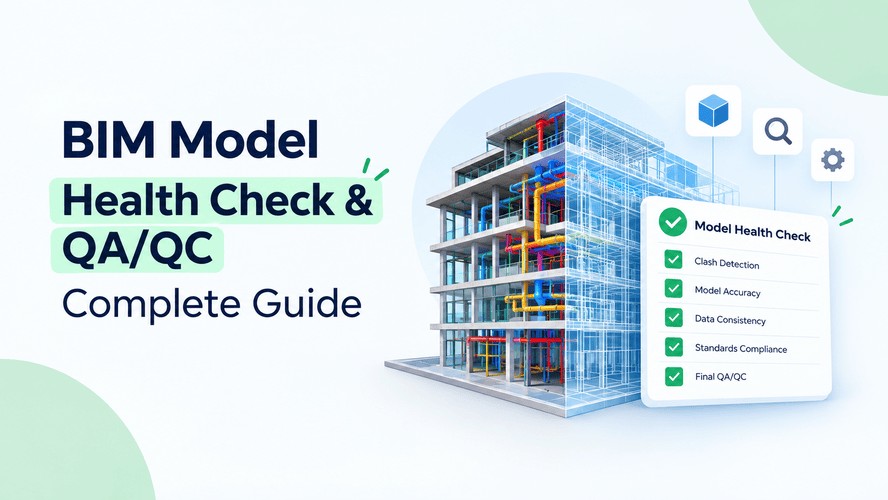
A BIM model health check is a structured audit of a Revit or BIM model that catches errors, warnings, duplicate elements, and missing data before they cause coordination problems or hold up a project. In practice, this process is called QA/QC (Quality Assurance/Quality Control), and it shows up as a named skill in real BIM coordinator job postings.
It's also a dedicated module in Kaarwan's BIM Certification Program (Module 7: Reality Capture & Design Intelligence), where students run health checks on real capstone models, not pre-cleaned practice files.
This guide covers what a health check looks for, how to run one step by step, and why Indian firms are paying more attention to it. If you want to see how model health requirements get defined in the BEP, that's a good companion read.
Also Read : What Is a BIM Engineer? Roles, Skills & Career Path in India
What Is a BIM Model Health Check?
Think of it as a full-body checkup for your model, done before it goes to the client, before it hits clash detection, and before anyone downstream has to trust the numbers in it.
A health check verifies three things: is the geometry accurate, is the data complete, and is the file clean enough to work in without crashing every ten minutes. Bad geometry means walls that don't join properly or elements sitting on the wrong level. Bad data means a fire door schedule with half the fire-rating fields left blank. A bloated file, with hundreds of unused families and a few imported CAD drawings nobody needs anymore, makes every coordination meeting slower than it should be.
If you're preparing for a BIM coordinator or BIM manager role, this is one of the most practical, job-ready skills you can build. It's less about knowing every Revit tool and more about the habit of asking "does this actually make sense?" before you hit submit.
What QA/QC Actually Checks For
QA and QC get used interchangeably, but they're different things, and the difference matters when you're writing reports or explaining your process to a senior.
Quality Assurance (QA)
QA happens before and during modeling. It's proactive. You set the naming conventions, templates, shared coordinates, and LOD requirements upfront so errors don't creep in at all.
Quality Control (QC)
QC is the inspection after the fact. You review what's already been modeled and flag what's wrong.
Here's what a QA/QC pass usually digs into:
- Model warnings: identical instances, overlapping walls, unenclosed rooms (a classic for junior modelers)
- Worksets: organized sensibly, or everything dumped into one bucket
- Families: correct categories, and no in-place families where a proper parametric family should sit
- Purge issues: unused line styles, materials, and imported CAD links that are just dead weight
- Parameters: fire ratings, acoustic values, and asset tags actually filled in
- Shared parameters and naming conventions: consistent across views, sheets, and families
A model that passes all of this isn't necessarily perfect, but it's coordination-ready. That's the bar.
Also Read : Understanding the BIM Workflow Process: Ultimate Guide
Ready to audit real BIM models? Kaarwan's BIM Certification Program teaches model health checks and QA/QC through hands-on capstone projects, not theory, so you're job-ready.
How to Run a BIM Model Health Check, Step by Step
There's no single universal checklist, and every firm tweaks its own. The sequence usually looks like this.
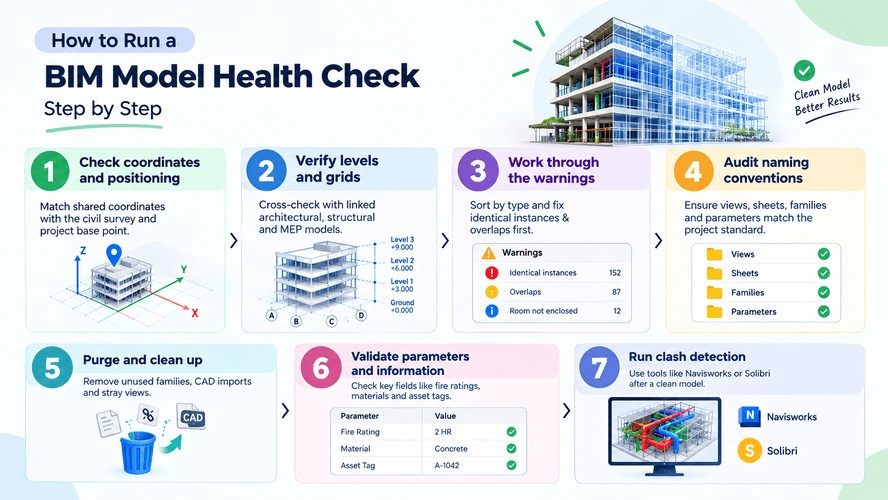
Step 1: Check coordinates and positioning
Confirm shared coordinates match the civil survey and the project base point sits where it should. Get this wrong and everything downstream is off.
Step 2: Verify levels and grids
Cross-check floor levels and grid lines against the linked architectural, structural, and MEP models. Small level mismatches are common and annoying to fix late.
Step 3: Work through the warnings
Open the warnings dialog and don't just close it in horror. Sort by type and start with identical instances and overlaps, which are usually quick wins.
Step 4: Audit naming conventions
Views, sheets, families, and parameters should match whatever BIM standard the project follows. It's boring, but it saves someone a headache six months down the line.
Step 5: Purge and clean up
Purge unused families, remove CAD imports you don't need, and delete stray views and broken links. File size often drops noticeably here.
Step 6: Validate parameters and information
Spot-check that mandatory fields like fire ratings, materials, and asset tags are populated and not left as placeholder text.
Step 7: Run clash detection
This comes after the health check, using tools like Navisworks or Solibri. A clean model makes the clash report far more trustworthy. If the model is messy, the report will be too.
Common Revit Warnings and What They Actually Mean
This is the part that separates "I've heard of QA/QC" from "I can actually do QA/QC". These are the ones you'll see constantly.
- "There are identical instances in the same place": two copies of the same element stacked on top of each other, usually from a copy-paste mishap. Schedules will double count them.
- "Room is not in a properly enclosed region": there's a gap in the room boundary, even a tiny one, so the room won't calculate its area correctly.
- "Highlighted walls overlap": two walls occupy the same space, which throws off quantity takeoffs.
- "Highlighted elements are joined but do not intersect": a join that no longer makes sense, often left behind after an edit. It's harmless until someone tries to modify the geometry.
- "Wall is slightly off axis and may cause inaccuracies": a wall drawn a fraction of a degree off, which causes trouble when you dimension or align to it.
- "Elements have duplicate 'Mark' values": two elements share a mark that should be unique, which breaks tagging and schedule logic.
None of these is catastrophic alone. But leave 500 of them sitting in a model and something important will get buried in the noise.
Why Model Health Matters Before Clash Detection
A common mistake early in a BIM career is jumping straight to clash detection. It feels efficient. Why clean up first when you can just find the clashes?
Because a messy model gives you false clashes and hides real ones. Identical instances show up as phantom clashes, and misaligned elements report conflicts that don't exist on site. You end up spending more time filtering noise than fixing real problems.
The same logic applies to approvals. On projects that follow ISO 19650, model health is essentially a gate the model passes before information is approved into the Common Data Environment (CDE). Here's how model health checks fit into the CDE approval process. No clean model, no approval.
What This Looks Like in India
The clearest public example is the Delhi-Meerut Namo Bharat corridor.
NCRTC states on its website that all Namo Bharat stations are being designed and developed on a BIM platform, and it runs a dedicated BIM lab called APARIMIT at the Duhai Depot for project-wide coordination. On a project that size, every discipline depends on the federated model being trustworthy, and unresolved warnings can't sit around for weeks.
The market is moving the same way. According to MarketsandMarkets, India's BIM market was valued at about $383 million in 2025 and is projected to reach roughly $1.04 billion by 2030. That's a 22.1% CAGR, against a global rate of 11.3%. More BIM work means more models to audit, and more demand for people who can do it well.
Model auditing isn't limited to new builds either. Model auditing also applies to scan-to-BIM models, which go through the same QA/QC process with point-cloud deviation checks added on top.
Common Mistakes People Make
- Treating QA/QC as a one-time, end-of-project task instead of something you do at every milestone
- Trusting automated tools like Solibri without a human looking at the results and asking whether they make constructability sense
- Ignoring soft clashes (clearance and maintenance access) because they don't show up as bright red the way hard clashes do
- Skipping the naming check because "it's not really an error", until three consultants name the same sheet three different ways and nobody can find anything
Want to move beyond tutorials? Learn to spot, fix, and document model errors in Kaarwan's Advanced Revit & BIM course, built on real project files.
Three Things to Take Away
- A health check isn't busywork. It's what makes clash detection and CDE approval mean something.
- Learn your Revit warnings by name. Identical instances, unenclosed rooms, and overlapping walls are things you'll see every week on the job.
- Model auditing is a skill employers ask for by name, and you can build it through Kaarwan's BIM course, which includes hands-on model auditing.
FAQs
What's the difference between QA and QC in BIM?
QA is preventive: setting standards, templates, and workflows before modeling starts. QC is corrective: reviewing the finished model to catch and fix errors. You need both, since one prevents problems and the other catches what slipped through.
How often should a BIM model be audited?
Ideally at every major milestone, not just before handover. Regular internal checks during production, plus a full audit before each multidisciplinary coordination meeting, keep small issues from snowballing.
What tools are used for BIM model health checks?
Revit's built-in warnings review and audit tools cover the basics. For rule-based checking, Solibri Model Checker is widely used. Dynamo and Ideate Explorer help automate repetitive checks and data validation, and Navisworks handles clash detection.
What does a BIM QA/QC coordinator actually do?
They run scheduled health checks, manage warning and clash logs, assign issues to the right discipline, verify fixes before closing them, and keep the model compliant with the project's BIM standards through to handover.