pyRevit is a free, open-source add-in for Revit that adds an extended toolbar with a range of ready-to-use automation tools. It also allows users to create custom scripts using Python, making it possible to automate more advanced or repetitive workflows as their needs grow.
You do not need a programming background to start using pyRevit. Many Revit users rely on its pre-built tools without writing any code themselves. With the right automation, tasks that would otherwise take several minutes or even an hour can often be completed in just a few clicks.
For architecture students and professionals working in BIM teams in India, pyRevit is worth exploring. Its value is less about following a trend and more about reducing repetitive work, improving workflow efficiency, and allowing users to spend more time on tasks that require actual design and coordination decisions.
Also Read : BIM Course in India 2026: Complete Guide for Architects & Engineers
What Is pyRevit, in Plain Terms?
Revit provides an API, or Application Programming Interface, that allows external software and scripts to interact directly with a Revit model. Traditionally, using the Revit API for custom automation has involved developing add-ins in languages such as C#, along with coding, compiling, testing, and maintaining the resulting software. For architects without a programming background, this can create a significant barrier to entry.
pyRevit simplifies this process by allowing users to run Python scripts directly within Revit and make them accessible through custom ribbon buttons. This means users can trigger automated workflows with a simple click, without having to work through a traditional software development environment such as Visual Studio or manually compile an add-in.
The tool was originally developed by architect Ehsan Iran-Nejad and is maintained as an open-source project by its community. It is released under the GPL v3 licence, allowing users to access, modify, and distribute the software under the terms of that licence.
The current 6.x release line continues to support a range of Revit versions, making pyRevit a practical option for teams working across different project environments and software versions.
pyRevit is also included among the tools covered in Kaarwan’s BIM curriculum, alongside other add-ins used in professional BIM workflows. Its practical value comes from its ability to automate repetitive tasks, reduce manual effort, and improve efficiency on real-world projects rather than simply adding another tool to a software portfolio.
What Can You Actually Do With pyRevit?
This is where people's eyes usually light up, because the examples are so mundane they're relatable.
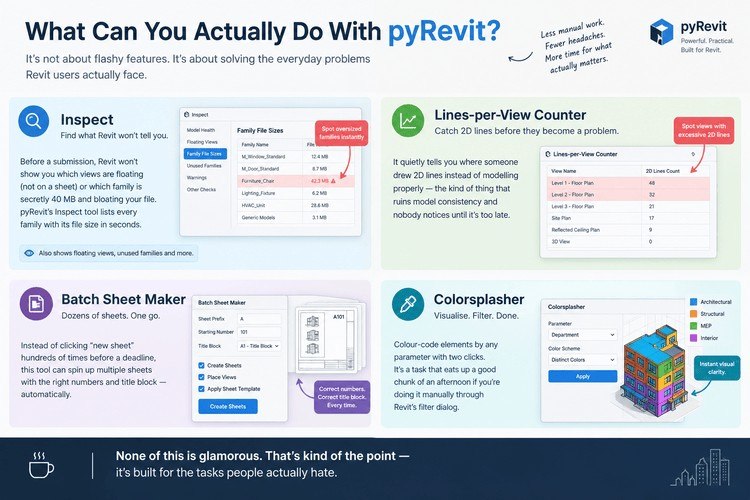
Say you're auditing a model before a submission - Revit won't tell you which views are floating without a sheet, or which family is secretly 40 MB and wrecking your file size. A pyRevit tool called Inspect will list every family with its file size in seconds. Another one, Lines-per-View Counter, quietly tells you where someone drew 2D lines instead of modelling properly - the kind of thing that ruins model consistency and nobody notices until it's too late.
Then there's the boring documentation stuff. Batch Sheet Maker can spin up dozens of sheets - correct numbers, correct title block - in one go, instead of you clicking "new sheet" two hundred times before a deadline. And Colorsplasher lets you colour-code elements by any parameter with two clicks, a task that eats up a good chunk of an afternoon if you're doing it manually through Revit's filter dialog.
None of this is glamorous. That's kind of the point - it's built for the tasks people actually hate.
Also Read : 3 Easy Ways to Automate BIM Tasks
Want to build automation skills alongside core BIM modelling? Kaarwan's Advanced Revit & BIM Certification Course covers pyRevit, Dynamo, and real project workflows.
pyRevit vs Dynamo: What's the Difference?
This comparison comes up constantly, so let's settle it.
Dynamo is visual. You drag nodes, connect wires, and build logic without typing a single line of code - Autodesk ships it free with Revit. It's brilliant for geometry, parametric façades, generative design, the kind of work where seeing the logic laid out visually actually helps you think.
pyRevit works differently. You're writing (or using someone else's) Python scripts, and it's aimed more at repeatable, everyday production tasks - sheet setup, model audits, parameter cleanups, batch exports. Dynamo can technically do most of these too, but for a task you'll run fifty times a month, a pyRevit button beats opening a Dynamo graph every single time.
| pyRevit | Dynamo | |
| Interface | Python scripting, ribbon buttons | Visual, node-based |
| Cost | Free, open-source | Free (bundled with Revit) |
| Best for | Repeatable production tools, model audits, documentation | Geometry, parametric design, one-off logic |
| Coding needed | None to use the built-in tools; Python to build your own | None - drag and connect |
| Team rollout | One button, works for everyone instantly | Usually needs Dynamo Player or a custom add-in to scale |
Honestly, they're not really competitors. A lot of BIM teams run both - Dynamo when they're figuring something out, pyRevit once that thing needs to become a daily habit for the whole office. If you want the deeper dive into how visual scripting works, how pyRevit compares to Dynamo is worth reading side by side with this.
Also Read: Essential Revit Automation Tips to Boost Productivity
Is pyRevit Free? What You Need to Install It
Yes - completely. No licence fee, no seat cost, no trial period that quietly expires. It's open-source, so you can even look at the code if you're the kind of person who wants to know exactly what's running on your machine.
To install it, you just need Revit already set up (any version from 2019 to 2027 works) and about ten minutes. Download the signed installer from the official pyRevit site, run it, restart Revit, and a new pyRevit tab shows up on your ribbon. That's genuinely it. If your firm's antivirus flags the installer - which happens sometimes with lesser-known software in Indian corporate IT setups - it's signed by the project team, so whitelisting it is safe.
For firms wanting to roll it out across a whole office, there's a command-line utility that lets a BIM manager pin one version and push it to every machine at once, so nobody's running a different release than everyone else.
How to Get Started With pyRevit (No Coding Required)
You genuinely don't need Python to get value on day one. Here's a realistic first week:
- Install it and click around. Just see where the tools live on the new tab.
- Pick your most annoying task. The one you'd happily pay someone else to do. That's your target.
- Run a model audit tool on a real project. Notice what it catches that you'd have missed doing it by hand.
- Try the batch sheet-making tool on your next set of sheets.
- Show a classmate or colleague the one tool that saved you the most time. That's usually how it spreads through a studio or an office - someone sees it work, not a memo about it.
Only once you're comfortable does it make sense to learn a bit of Python and build your own custom buttons. Most people never need to - the built-in tools cover 80% of what a student or working professional actually runs into.
With India's construction sector leaning harder into digital workflows - CPWD now requires BIM integration on government projects above ₹20 crore, and projects like NCRTC's Namo Bharat RRTS stations are being designed entirely on BIM platforms - knowing how to automate the boring parts of Revit isn't a nice-to-have anymore. It's becoming part of the baseline skill set firms expect.
Also, don't stop at just this one tool. Other Revit productivity add-ins worth knowing sit alongside pyRevit in most professional toolkits, and it's worth knowing what each one is actually for before you commit time to learning it.
Learning Revit the right way means learning what speeds it up too. Kaarwan's BIM Certification Program teaches automation tools like pyRevit hands-on, not just theory.
FAQs
Is pyRevit safe to install on a work computer?
Yes. It's a signed, community-maintained installer with no hidden costs or telemetry sold to anyone. The only tools worth being careful with are the destructive ones (like model-cleanup tools) - test those on a copy of your file first, not a live worksharing model.
Do I need to know Python to use pyRevit?
No. Every tool bundled with pyRevit works with a click. Python only becomes relevant if you want to build your own custom tools later.
Is pyRevit the same as Dynamo?
No - they solve similar problems differently. Dynamo is visual and node-based; pyRevit runs Python scripts and turns them into ribbon buttons. Many firms use both.
Does pyRevit work with every version of Revit?
It supports a wide range, roughly Revit 2019 through 2027 as of the current release. Always check the compatibility notes on the official site before installing on an older Revit version.