Architecture is evolving rapidly, and parametric design has become a fundamental approach in modern projects. With computational tools like Grasshopper, architects and designers can explore complex geometries and optimize designs efficiently. If you’ve ever wondered how futuristic buildings are created, chances are algorithmic design with Grasshopper plays a significant role. Whether you’re a professional looking to incorporate computational design into your workflow or a student aiming to expand your skill set, learning Grasshopper can be a game-changer.

Image Credit: Research Gate
What is Algorithmic Design?
Algorithmic design is a computational method of form generation where architects use mathematical principles and constraints to create intricate structures. Instead of manually drafting every detail, designers develop algorithms that define relationships between elements, allowing for dynamic and flexible models.
Grasshopper, a visual programming tool within Rhino, enables designers to achieve this without requiring advanced coding knowledge. By connecting nodes, users can create complex forms, automate repetitive tasks, and optimize designs to meet real-world constraints.
Why Grasshopper?
Grasshopper has become a preferred tool for parametric design in architecture due to its adaptability and ease of use. Key advantages include:
- Visual Scripting Interface – Unlike traditional programming languages, Grasshopper uses a node-based system that simplifies parametric modeling.
- Seamless Integration with Rhino – Since Grasshopper is a native Rhino plugin, users can seamlessly switch between freeform modeling and algorithmic design.
- Limitless Possibilities – From generative design to façade optimization, Grasshopper offers unparalleled control over architectural geometry.
- Growing Industry Demand – As parametric design continues to shape the built environment, architectural firms are increasingly looking for experts in Grasshopper architecture.
Applications of Algorithmic Design in Architecture
1. Complex Geometry and Form Finding
Parametric design enables architects to explore unconventional forms that would be difficult to achieve manually. Whether it’s fluid roof structures or organic-inspired façades, Grasshopper allows for quick generation and refinement of intricate geometries.
2. Environmental Optimization
Sustainability is a key aspect of modern architecture. Grasshopper integrates climatic data analysis, allowing architects to perform simulations like:
- Daylight studies to optimize natural lighting
- Wind flow simulations for passive ventilation strategies
- Thermal performance evaluations to enhance energy efficiency
3. Façade Design and Pattern Generation
Grasshopper allows designers to create adaptive façades that respond to environmental conditions. Whether designing perforated screens for airflow or dynamic shading systems, algorithmic design enhances both aesthetics and functionality.
4. Structural Optimization
Grasshopper enables engineers and architects to optimize structural components by analyzing forces and material efficiency. Plugins like Karamba3D provide real-time structural simulations, ensuring that complex forms are not only visually striking but also structurally sound.
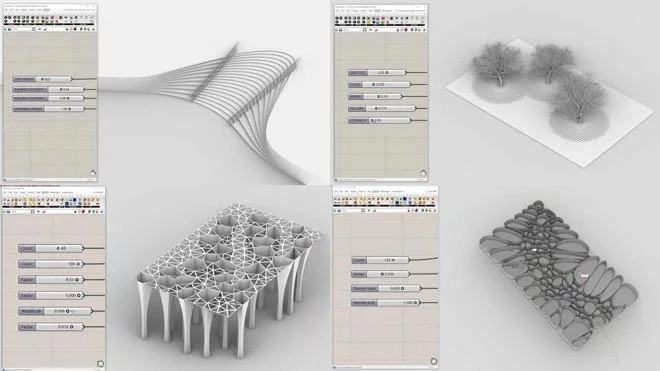
Image Credit: Howtorhino
5. Digital Fabrication
Algorithmic design in Grasshopper streamlines the transition from digital models to physical fabrication. Designers can generate fabrication-ready models for:
- CNC milling
- Laser cutting
- 3D printing
Getting Started with Grasshopper
If you’re new to Grasshopper, the learning curve might seem steep, but with the right approach, it becomes a powerful addition to your architectural toolkit. Here’s how to begin:
- Download Rhino and Grasshopper – Ensure you have Rhino installed, as Grasshopper is included by default.
- Learn the Basics – Get familiar with fundamental components like points, curves, surfaces, and transformations.
- Take a Structured Course – Platforms like Kaarwan offer specialized Grasshopper training courses for architects.
- Experiment with Simple Scripts – Start with basic parametric models like grids, panelized surfaces, and responsive facades.
- Join Grasshopper Communities – Engage in forums and online groups to accelerate learning and troubleshoot design challenges.
Advanced Techniques in Grasshopper
Once you’re comfortable with the basics, explore advanced techniques:
- Data Tree Management – Handle complex data structures for controlling multiple elements in your model.
- Plugins Like Kangaroo & Ladybug – Extend Grasshopper’s capabilities with physics simulations and environmental analysis.
- Generative Design Using Evolutionary Solvers – Utilize tools like Galapagos to optimize designs based on specific constraints.
Final Thoughts
Algorithmic design is shaping the future of architecture, and Grasshopper skills are in high demand across the industry. Whether you’re designing sustainable buildings, futuristic skyscrapers, or streamlining fabrication processes, Grasshopper allows you to push architectural boundaries.
If you're ready to take your skills to the next level, explore Kaarwan’s advanced courses on Grasshopper and parametric design to gain hands-on experience and refine your expertise.
Visit our website Kaarwan for more!
FAQs
1. Is learning Grasshopper difficult?
No, Grasshopper is beginner-friendly, especially compared to traditional coding. With practice and structured learning, it becomes intuitive.
2. Do I need Rhino to use Grasshopper?
Yes, Grasshopper is a plugin within Rhino and relies on it to function.
3. Can Grasshopper be used for Vastu-based designs?
Yes! Grasshopper can integrate ancient Vastu architectural principles to create parametric models that align with Vastu Shastra guidelines.
4. Besides architecture, what industries use Grasshopper?
Grasshopper is widely used in industrial design, jewelry design, engineering, and even fashion, thanks to its parametric capabilities.
5. Where can I get professional training in Grasshopper?
Kaarwan offers specialized Grasshopper courses tailored for architects and designers, making parametric modeling more accessible and effective.
Cover Image Credit: 3dmaxfarsi