

Picture this: you are a third-year architecture student sitting through a studio review. Your panel includes a visiting consultant from a firm that just delivered a GRIHA 5-star-rated building in Pune. She asks one question: 'Did you run any solar or daylight analysis before finalising the orientation?' You shake your head. The room goes quiet.
That moment is becoming more common in Indian design schools, and the profession is not waiting for academia to catch up. Firms across Mumbai, Bengaluru, Hyderabad, and Delhi are quietly prioritising graduates who can translate environmental data into design decisions, not just aesthetics. In 2026, Ladybug Tools sits at the centre of that shift.
This guide is not a dry software manual. It is a practical, researched breakdown of what Ladybug Tools actually is, why Indian students specifically are searching for it in growing numbers, and what you need to learn, in what order, to build a skill set that firms are genuinely looking for right now.
Where It Started: The Frustration That Built an Ecosystem
In 2012, a building environmental engineer named Mostapha Sadeghipour Roudsari was tired. Tired of bouncing between disconnected software tools, tired of workflows that made no sense, and tired of how few designers actually understood environmental building performance. So he built something.
The first version of Ladybug was released in January 2013 as a free, open-source plugin for Grasshopper inside Rhino. It had just 28 components, enough to pull in a weather data file, visualise sun paths, and run basic solar radiation studies. By architecture software standards, that is modest. By impact, it was enormous.
A year later, Honeybee followed. Then Butterfly (for computational fluid dynamics), then Dragonfly (for urban-scale climate modelling). Chris Mackey joined the project, and by 2017, the two co-founded Ladybug Tools LLC to give the project a commercial backbone while keeping every core plugin free to download. That matters enormously for students in India, where budget constraints are real and many powerful tools sit behind expensive licence walls.
The naming logic is quite interesting: Mostapha wanted a name containing 'bug' so the software could never be fully debugged. He chose Ladybug over Bedbug. Honeybee made sense because it gathers the best from multiple simulation engines. Butterfly was the obvious pick for airflow. Dragonfly, being migratory, is well-suited to large-scale climate work. The insect metaphor stuck, the community grew, and today, Ladybug Tools is the third-most-downloaded plugin for Grasshopper globally, with over 100,000 downloads.
Why India in 2026 Is a Different Conversation
The Indian green building market is on a trajectory that does not leave room for ambiguity. As of 2025, the sector is valued at approximately USD 15.5 billion and is projected to reach USD 32.2 billion by 2032, growing at 11.3% annually. Certification bodies like GRIHA, IGBC, and LEED have moved from niche credentials to mainstream project requirements.
What this creates for architecture and engineering students is a clear professional signal: the ability to simulate and justify a design decision using environmental data is no longer a differentiator. In 2026, it is becoming a baseline expectation.
There is a practical layer to this that most tutorials overlook. India's climate diversity is extreme. A building designed for Chennai performs differently from one in Shimla or Jodhpur. Each city has distinct solar angles, humidity profiles, monsoon patterns, and wind behaviour. Generic design intuition fails in this context. What does not fail is Ladybug's ability to pull in an EPW (EnergyPlus Weather) file for any Indian city and generate site-specific environmental analysis within minutes.
Students are increasingly searching for terms like 'Ladybug Tools tutorial India', 'Honeybee Grasshopper sustainable design', 'EPW file India Ladybug', 'solar radiation analysis Grasshopper beginners', and 'Dragonfly urban heat island India'. The search intent is consistent: they want practical, India-specific workflows, not generic overviews written for a Western context.
The other driver is on project work. Thesis students and design school competitions increasingly reward performance-backed proposals. When a student can show a jury a Ladybug radiation analysis that proves why a particular façade orientation reduces heat gain by 30%, the proposal shifts from opinion to evidence. Juries notice the difference.
The Four Tools You Actually Need to Understand
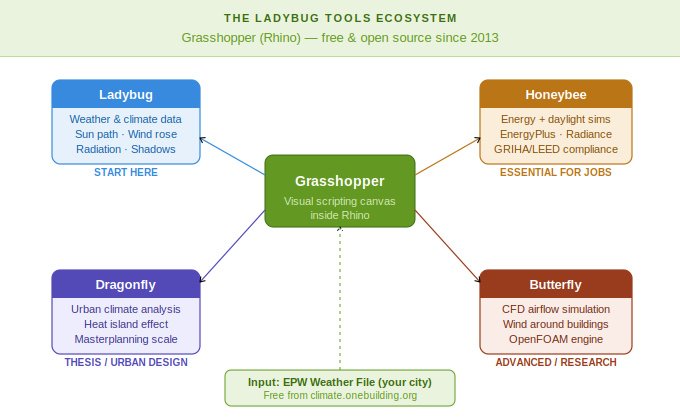
Ladybug Tools is not a single application. It is an ecosystem of plugins, each doing a specific job at a different scale of analysis. Confusion about this is one of the most common reasons beginners get stuck. Here is how to think about them:
Ladybug: Your First Stop
Ladybug is the starting point and the most beginner-friendly layer. It imports EPW weather files and transforms raw climate data into visual diagrams you can actually read and use. Wind roses, sun path diagrams, psychrometric charts, radiation roses, solar hour studies, and temperature range visualisations all live here. If you are learning from scratch, Ladybug is where you spend your first few weeks.
Honeybee: Where Design Gets Intense
Honeybee connects Grasshopper to validated simulation engines: EnergyPlus for energy modelling, Radiance and Daysim for daylight analysis, and OpenStudio as an intermediary. This is where you move from 'this site gets a lot of sun' to 'this window configuration achieves 300 lux at the work plane for 70% of occupied hours'. It takes longer to learn, but this is the layer that makes you useful in a professional firm. Honeybee also handles thermal comfort modelling using ASHRAE 55 standards, which is increasingly relevant for GRIHA compliance documentation.
Dragonfly: Thinking at an Urban Scale
Dragonfly scales the analysis from a single building to a neighbourhood or city block. It connects to the Urban Weather Generator (UWG) to model how the urban heat island effect changes microclimates, which is directly relevant to the thesis work on Indian cities dealing with rapid densification. If your studio project is a masterplan, mixed-use complex, or urban intervention in a tier-1 or tier-2 city, Dragonfly is worth learning in your final year.
Butterfly — For the Curious About Airflow
Butterfly handles Computational Fluid Dynamics (CFD) by connecting Grasshopper to OpenFOAM. It lets you simulate wind movement around and through your building. This is more advanced and primarily relevant for high-performance or research-oriented projects. Most architecture students will get significant value from Ladybug and Honeybee alone before needing Butterfly.
A Step-by-Step Learning Roadmap for 2026
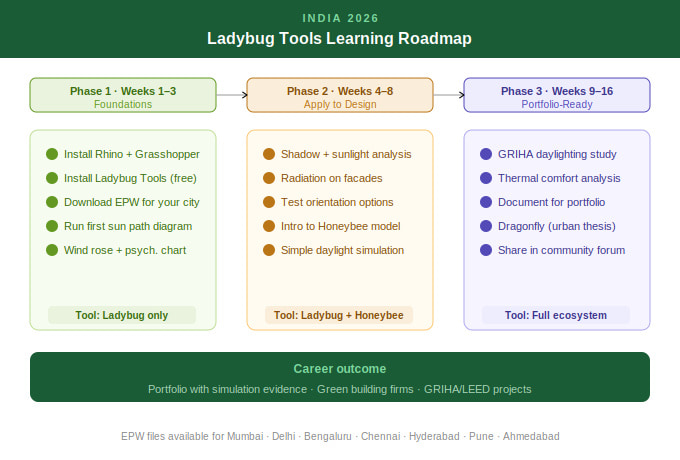
The mistake most students make is jumping into Honeybee energy simulations before they understand the fundamentals. Here is the sequence that actually works:
Phase 1: Get the Foundations Right (Weeks 1–3)
- Install Rhino 7 or 8 and open Grasshopper (it ships with Rhino, no extra cost).
- Install Ladybug Tools from Food4Rhino — it is free. Get the latest version (1.8 as of early 2026).
- Download an EPW weather file for your city from climate.onebuilding.org — this is your real climate data.
- Run your first Ladybug component: import the EPW file and generate a sun path diagram for your location.
- Practice with the wind rose, radiation rose, and psychrometric chart. Learn what these diagrams actually tell you about your site before a single line is drawn.
Phase 2: Apply Climate Data to Design (Weeks 4–8)
- Learn shadow analysis and sunlight hours studies using actual geometry from Rhino.
- Run a radiation analysis on a simple building massing to test which façades gain the most heat.
- Test how changing building orientation affects solar exposure for a site in your city.
- Begin with Honeybee: set up a basic room model, assign materials, and run a simple daylight simulation.
- Use the Ladybug Tools documentation at docs. ladybug.tools — it is well-maintained and free.
Phase 3: Build Portfolio-Ready Outputs (Weeks 9–16)
- Run a full daylighting compliance study using Honeybee — try to meet ECBC or GRIHA daylight targets.
- Model a thermal comfort analysis using Honeybee's UTCI or PMV components.
- Document your process with screenshots and analysis diagrams for your portfolio — these are rare and stand out immediately.
- Explore Dragonfly if your thesis or studio project involves urban-scale design in an Indian city.
- Try submitting a short workflow for a student competition or online community critique — the Ladybug Discourse forum is active and welcoming to beginners.
Real India, Real Applications: What This Looks Like in Practice
Theory is useful. Context is more useful. Here is what Indian architecture students and practitioners are actually doing with these tools in 2026:
Case Study 1: Orientation Decisions in a Mixed-Use Project
A design team working on a mixed-use complex in Hyderabad used Ladybug's radiation analysis to compare three massing configurations. The analysis, run using the Hyderabad EPW file, showed that rotating the residential towers 12 degrees west of north reduced peak west-facing radiation by 23% without compromising views or unit layouts. This single change influenced the structural grid, window sizing, and external shading depth across the building. The decision took a few hours of simulation. The traditional alternative was intuition and precedent.
Case Study 2: Thesis Research on Urban Heat in Delhi
A final-year student at an architecture college in Delhi used Dragonfly to model the urban heat island effect in a dense residential neighbourhood in East Delhi. By running the Urban Weather Generator with actual morphological data, she demonstrated that strategic placement of green corridors could reduce summer UTCI values by 2 to 3 degrees Celsius in outdoor pedestrian zones. This analysis formed the core evidence base for her thesis proposal. No survey, no fieldwork required for the environmental data layer.
Case Study 3: GRIHA Documentation Support
A sustainability consultant in Bengaluru used Honeybee to generate daylight compliance documentation for a commercial office project targeting GRIHA 4-star certification. The Radiance-based simulation produced Spatial Daylight Autonomy (SDA) outputs that met the certification criteria, and the Grasshopper definition was reusable across multiple floors of the same project. The firm reported significant time savings compared to running standalone simulation software for each floor.
These are not hypothetical scenarios. They represent the kind of work that firms ask about in interviews. Having even one of these in your portfolio positions you differently from a graduate who only has rendered images.
Why This Skill Belongs in Your Portfolio Right Now
The question students often ask is whether learning Ladybug Tools is worth the time investment, given everything else on their plate. Here is the honest answer:
Firms like HOK, Woods Bagot, and regional AEC consultancies in India explicitly list environmental simulation capability in their job descriptions. In the computational design space, studios in Mumbai, Pune, Bengaluru, and Chennai are hiring people who understand how Rhino, Grasshopper, Ladybug, and Honeybee work together. As recently as a 2026 analysis of computational design studio workflows in India, Ladybug and Honeybee were listed as expected tools alongside Rhino and Kangaroo for any environmental performance scope.
The practical advantage is that these tools are free and open-source. Your institutional email does not need a licence. You do not need a firm's server. A laptop with Rhino (which most architecture schools already provide access to) is enough to build a working skill set over a semester.
The less obvious advantage is the thinking shift. Learning Ladybug forces you to study your site's climate before you design. It creates a habit of evidence-based reasoning that changes how you approach every project, not just the ones where you use the tool.
Where to Learn: Free and Paid Resources in 2026
Free Resources
- Ladybug Tools official documentation: docs. ladybug.tools — complete, updated, and well-organised.
- Ladybug Tools video tutorials on Vimeo: free access for students whose institutions have partnered with Ladybug Tools LLC.
- HowToRhino.com: free step-by-step tutorials on environmental analysis with Ladybug, including EPW file import.
- Ladybug Tools Discourse forum: discourse. ladybug.tools — an active community where even the developers answer questions.
- ThinkParametric.com: free introductory modules on Honeybee energy analysis.
Structured Learning
- Ladybug Tools Academy (ladybug-tools-academy.teachable.com): monthly subscription for legacy plugin tutorials, including THERM.
- Sustainable Design Network (sustainabledesignacademy.com): a structured Ladybug Tools complete training course taught live by the plugin developers themselves.
- Kaarwan's Advanced Rhino and Grasshopper Certification: includes environmental analysis workflows tailored for Indian students with job support and portfolio guidance.
- Udemy: Honeybee energy simulation courses for beginners — practical, self-paced, internationally reviewed.
The Bigger Picture
India's construction sector is building fast. According to the green building market data, that pace is not slowing down, and the expectation of sustainability compliance is only increasing as the ECBC, GRIHA, and IGBC frameworks gain traction across state-level projects. In that environment, a designer who cannot back up an orientation decision with data is working at a disadvantage.
Ladybug Tools does not make you a sustainability expert overnight. But it gives you a language, a workflow, and a set of outputs that translate environmental intelligence into design intelligence. For an architecture or engineering student in India in 2026, that is a meaningful edge.
Start with the EPW file for your city. Run your first sun path. See the data. Then ask better questions of your own designs and take your first step today.
FAQs
Q1: Is Ladybug Tools free to use?
Yes. Ladybug, Honeybee, Dragonfly, and Butterfly are free open-source plugins, but you’ll need Rhino, which is paid.
Q2: Do I need to know Grasshopper before learning Ladybug Tools?
Basic Grasshopper knowledge helps, but you can learn both together with beginner-friendly tutorials.
Q3: Where can I find EPW weather files for Indian cities?
You can download free EPW files for Indian cities from climate.onebuilding.org.
Q4: Which version of Ladybug Tools should I install in 2026?
Use the latest Ladybug Tools for Grasshopper version (1.8 as of 2026) from Food4Rhino.
Q5: Can Ladybug Tools help with GRIHA or LEED certification work?
Yes. Honeybee supports daylight, thermal comfort, and energy analysis used in GRIHA and LEED workflows.
Q6: How long does it take to learn Ladybug Tools professionally?
Most students become comfortable with basics in 3–4 months with regular practice.
Q7: Is Ladybug Tools useful for urban design projects?
Yes. Dragonfly helps analyse urban microclimate, massing, and outdoor comfort at the neighbourhood scale.
Q8: Will Ladybug Tools help me get a job in architecture firms?
Yes. Environmental analysis skills are highly valued by sustainability-focused architecture firms.
Q9: What is the difference between Ladybug and Honeybee?
Ladybug handles climate visualisation and solar studies, while Honeybee enables detailed energy and daylight simulations.
Q10: Can I learn Ladybug Tools through Kaarwan?
Yes. Kaarwan’s Advanced Rhino and Grasshopper Certification includes environmental analysis workflows and project-based learning.




.png)