


RhinoCAM has become a vital tool for architects and designers working in parametric design architecture. Whether you are a seasoned professional or just beginning your journey, learning how to optimize your workflows with this tool can significantly elevate your projects. This article will help you learn about RhinoCAM’s capabilities, how it integrates with Grasshopper software, and how mastering these tools can enhance your Rhino architecture workflows. Along the way, we will explore the benefits of taking a Rhino course to sharpen your skills.
What is RhinoCAM?
RhinoCAM is a CAM (Computer-Aided Manufacturing) plug-in for Rhino that supports advanced machining capabilities. Used predominantly in architectural and product design fields, it allows for highly detailed, precise manufacturing directly from Rhino models. Its ability to work with parametric models makes it especially powerful when paired with Grasshopper software, a Rhino plug-in known for its strength in parametric design architecture.
RhinoCAM is equipped with a range of tools that allow users to execute tasks like 2.5-axis to 5-axis milling, drilling, and pocketing. This flexibility offers architectural designers the freedom to create intricate designs while ensuring that they can be manufactured efficiently.
Why RhinoCAM is Essential for Parametric Design
In parametric design architecture, changes to one element of a model can trigger cascading modifications across the entire design. This dynamic workflow allows for greater flexibility and creativity. RhinoCAM integrates seamlessly with Grasshopper software, allowing architects to manufacture complex parametric designs easily.
For example, if you have created a façade design with Grasshopper, RhinoCAM can convert this design into machine instructions that can be used for CNC machining. This level of integration ensures that even highly complex geometries can be translated into physical models without losing their parametric integrity.
Key Benefits of RhinoCAM:
- Precision Manufacturing: Accurate machining of intricate geometries from parametric design.
- Flexibility: Suitable for various materials and machining techniques.
- Seamless Workflow: Efficient integration with Rhino and Grasshopper software.
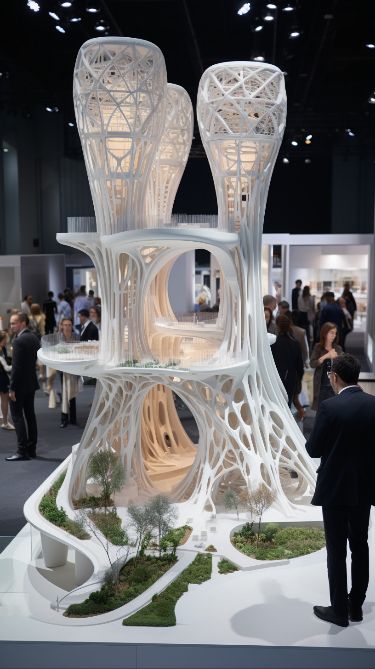
Architectural model_©Mariia Gonchar on behance.net
Optimizing RhinoCAM for Architectural Workflows
As you venture deeper into Rhino architecture, it is crucial to understand how to streamline your RhinoCAM workflows. The following steps will help you make the most of this tool, ensuring that your projects run smoothly from design to manufacturing.
Setting Up a Parametric Workflow
The first step in optimizing your workflow is setting up a parametric design system within Grasshopper software. This tool allows you to create design logic that responds to changes in real-time. Once you’ve created a parametric model, RhinoCAM can step in to handle the manufacturing process.
- Start with a Clear Design Plan: Before diving into the technical aspects, map out the parametric relationships you want to incorporate. Whether you’re working on a façade or a complex structure, the design logic should be clear.
- Use Grasshopper for Iterations: One of the main benefits of using parametric design architecture is the ability to quickly test multiple design iterations. Use Grasshopper to explore various forms and geometries without needing to rebuild the model.
- Prepare for Machining: Once satisfied with your design, export it to RhinoCAM for detailed machining instructions. Ensure that your parametric changes are compatible with CNC manufacturing.
Leveraging RhinoCAM for Large-Scale Projects
For large-scale architectural projects, where precision is key, RhinoCAM proves invaluable. It enables designers to create detailed prototypes, mock-ups, and final models. The ability to handle large files and complex geometries is crucial in architectural applications.
For example, let’s say you’re tasked with creating an elaborate building façade with hundreds of unique panels. RhinoCAM allows you to generate machining paths for each panel based on your parametric design created in Grasshopper. The result is a streamlined process that reduces errors and speeds up production time.
Example: Optimizing the Façade of an Office Building
In one notable case, an architecture firm used RhinoCAM and Grasshopper software to design the intricate façade of an office building. The parametric model allowed the team to iterate and refine the design with ease. Once the design was finalized, RhinoCAM generated the necessary CNC instructions to manufacture each unique façade panel, making the project both efficient and precise.
Steps They Followed:
- Parametric Design Creation: The design team used Grasshopper software to develop a responsive façade system.
- RhinoCAM Machining Paths: Once satisfied with the design, they used RhinoCAM to generate the machining paths for each panel.
- CNC Machining: The panels were machined and assembled, with minimal need for adjustments thanks to the accuracy of RhinoCAM’s machining instructions.
Taking a Rhino Course to Master Complex Workflows
Mastering RhinoCAM and its integration with Grasshopper requires time and practice. Enrolling in a Rhino course can significantly speed up your learning process, providing you with the skills needed to tackle complex parametric design architecture projects.
These courses typically cover everything from the basics of Rhino and Grasshopper to advanced parametric modeling and CNC machining using RhinoCAM. Through practical exercises, you can learn how to set up parametric workflows, troubleshoot common issues, and execute precise machining tasks.
Benefits of a Rhino Course:
- Hands-On Learning: Gain experience with real-world projects.
- Expert Guidance: Learn from industry professionals with in-depth experience.
- Comprehensive Skillset: Master Rhino, Grasshopper, and RhinoCAM for a complete workflow.
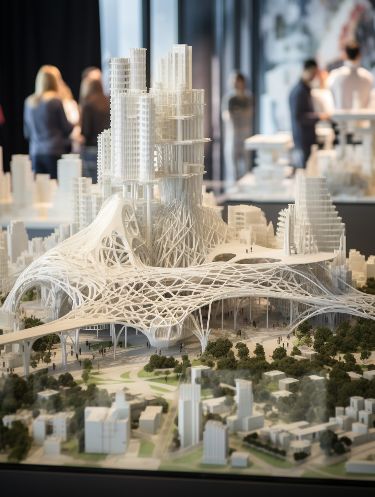
Urban Housing model_©Mariia Gonchar on behance.net
Enhancing Your Career with Rhino and Grasshopper Expertise
As more architectural firms adopt parametric design architecture, mastering tools like Rhino, Grasshopper software, and RhinoCAM will give you a competitive edge. These skills allow you to tackle more complex projects, create detailed parametric designs, and ensure that they can be manufactured efficiently.
With the rise of parametric design, architects who are proficient in these tools are in high demand. A solid understanding of Rhino architecture workflows and the ability to execute them with precision will open doors to new opportunities.
Skills You Will Gain:
- Advanced Parametric Modeling: Using Grasshopper to create dynamic, responsive designs.
- Efficient Machining: Translating your designs into precise CNC instructions with RhinoCAM.
- Streamlined Workflow: Managing the design-to-manufacture pipeline efficiently.
Conclusion
Mastering RhinoCAM for complex parametric design architecture is essential for modern architects looking to elevate their design and manufacturing capabilities. By leveraging the power of Grasshopper software and RhinoCAM, you can optimize your architectural workflows, ensuring that your designs are both innovative and feasible to manufacture.
Taking a Rhino course is an excellent way to gain expertise in these tools, enabling you to tackle even the most intricate architectural projects. Whether you're working on a façade, a complex structure, or a large-scale project, Rhino and RhinoCAM will allow you to bring your parametric designs to life with precision and efficiency.
By learning these tools, you position yourself at the cutting edge of architectural design, ready to take on projects that push the boundaries of what is possible.
Want to stay ahead in the competitive world of architecture? Rhino and Grasshopper are your secret weapons. Enroll in our Advance Rhino & Grasshopper Certification Course and gain the skills you need to succeed.
Visit the Kaarwan website for more insights!
FAQs
Q1: What is RhinoCAM?
A1: RhinoCAM is a Computer-Aided Manufacturing (CAM) plug-in for Rhino software. It allows architects and designers to execute precise machining tasks like milling and drilling directly from Rhino models. Its integration with parametric design architecture through Grasshopper software enhances its capabilities.
Q2: How does RhinoCAM integrate with Grasshopper software?
A2: RhinoCAM works seamlessly with Grasshopper by converting parametric designs into machine-readable instructions. This integration allows architects to easily manufacture complex designs, such as facades or unique building elements, using CNC machining.
Q3: Why is RhinoCAM important for parametric design architecture?
A3: In parametric design architecture, RhinoCAM enables precision machining of complex geometries generated in Grasshopper. This integration allows designers to automate the manufacturing process while maintaining the integrity of their parametric models.
Q4: How can I optimize my RhinoCAM workflow for architectural projects?
A4: To optimize your workflow, start by setting up a parametric model in Grasshopper. From there, use RhinoCAM to create machining paths for your design. Ensure compatibility between your parametric elements and the CNC manufacturing process for a smooth transition from design to production.
Q5: What are the benefits of taking a Rhino course for mastering RhinoCAM?
A5: A Rhino course offers hands-on experience, expert guidance, and practical skills in using Rhino, Grasshopper, and RhinoCAM. This comprehensive training allows you to master parametric modeling, troubleshoot issues, and improve your design-to-manufacturing workflow.




