


Rhino Architecture has transformed the way architects work within the AEC (Architecture, Engineering, and Construction) industry. Its ability to handle complex designs has made it a go-to tool for architects looking to push creative boundaries. As a result, Rhino is now a staple in architectural design, offering unparalleled flexibility and precision.
For architects to succeed in today's competitive market, proficiency in Rhino is essential. But what makes this software so indispensable? This article will help you learn about Rhino's key skills and how they can elevate your architectural projects.
The Rise of Computational Design in Modern Architecture
Computational design has completely transformed modern architecture, allowing for the creation of intricate and innovative designs that were once impossible. Unlike traditional methods, computational design uses algorithms to generate complex forms, offering architects a new level of creativity and precision.
- Enhanced Creativity: Computational design enables architects to explore designs that go beyond conventional limits.
- Increased Efficiency: Automating repetitive tasks through algorithms speeds up the design process.
- Adaptability: Designs can be easily modified to meet specific project requirements.
This shift has opened new avenues for architects, with Rhino at the forefront, providing the tools needed to excel in computational design.
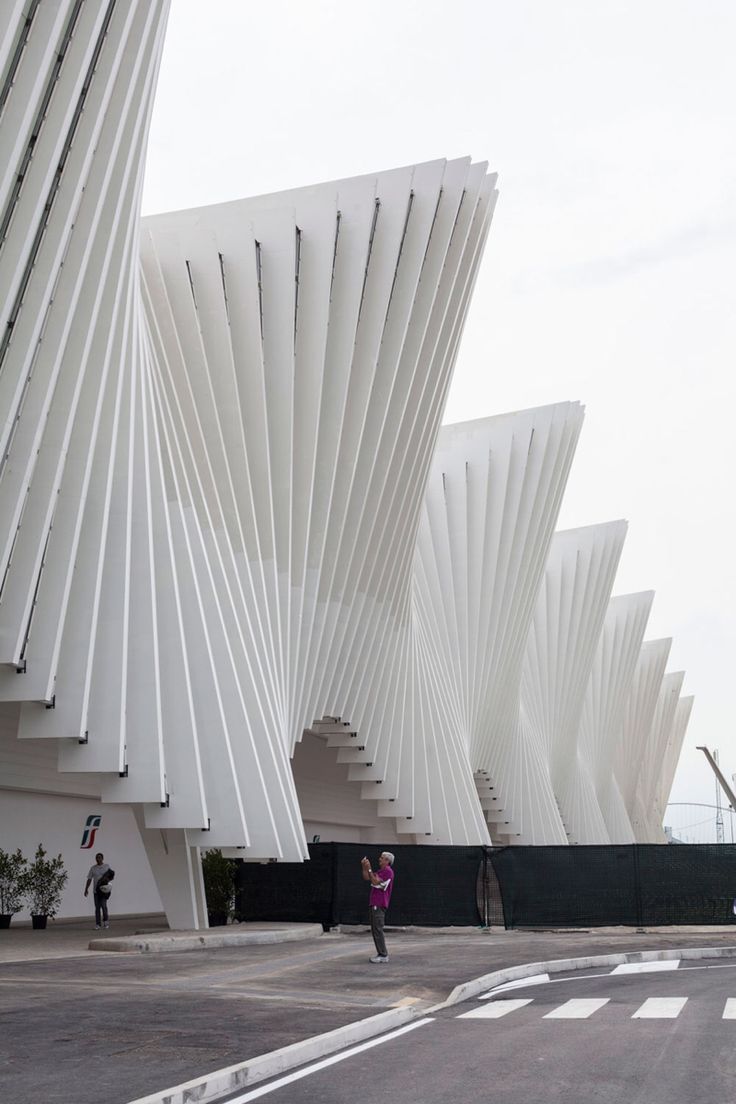
Mediopadana Station by Santiago Calatrava_©parametric-architecture.com
Why Rhino Architecture is a Must-Have for Architects
Rhino’s versatility and precision make it an indispensable tool for architects. It supports a wide range of design tasks, from initial concept development to detailed modeling. The software’s compatibility with tools like Grasshopper and BIM systems adds to its appeal, making it essential for both conceptual and practical work.
Key Reasons to Use Rhino:
- Precision Modeling: Rhino’s NURBS modeling allows for the creation of highly accurate curves and surfaces.
- User-Friendly Interface: Despite its powerful features, Rhino remains accessible to users, allowing architects to focus on creativity.
- Compatibility: Rhino integrates seamlessly with other software, enhancing its functionality and making it adaptable to various design needs.
Understanding Grasshopper Software in Parametric Design
Grasshopper, a visual scripting tool within Rhino, has become essential for parametric design architecture. It allows architects to create complex algorithms that define relationships between different design elements, leading to highly adaptable and innovative designs.
Benefits of Grasshopper in Parametric Design:
- Flexibility: Grasshopper enables the exploration of complex patterns and forms, making it a powerful tool for innovative design.
- Efficiency: Automating repetitive tasks through scripts saves time and enhances productivity.
- Integration: Grasshopper works seamlessly with Rhino, allowing for the creation of parametric models that adapt to various design challenges.
By mastering Grasshopper, architects can push the boundaries of what’s possible, unlocking new creative potential.
Essential Skills Every Computational Design Architect Must Master
To excel in computational design, architects must develop a diverse set of skills. Proficiency in 3D modeling using Rhino is crucial, as it forms the foundation of all design work. Additionally, scripting in Grasshopper allows for the automation of design processes, enabling architects to create complex parametric models efficiently.
Key Skills for Success:
- 3D Modeling: Mastery of Rhino’s modeling tools is essential for creating accurate and detailed designs.
- Scripting in Grasshopper: This skill allows architects to automate tasks and create dynamic, parametric models.
- Problem-Solving: The ability to think critically and adapt to new challenges is crucial in the fast-evolving field of computational design.
Developing these skills will help architects stay ahead in the competitive world of computational design, ensuring they can tackle any project with confidence.
How Rhino Supports Complex Parametric Design Architecture
Rhino’s integration with Grasshopper makes it an ideal tool for developing complex parametric designs. This combination allows architects to create models that are not only visually stunning but also highly functional. By defining relationships between different elements, architects can ensure their designs are both innovative and practical.
Advantages of Using Rhino for Parametric Design:
- Dynamic Design Process: Rhino supports a flexible design process where changes can be made quickly and efficiently.
- Visual Appeal: The software’s precision modeling capabilities result in visually stunning designs.
- Practical Functionality: Rhino’s features ensure that designs are not only beautiful but also functional and feasible.
In parametric design, Rhino plays a crucial role in turning ambitious ideas into reality, supporting architects in creating cutting-edge designs.
The Role of Rhino in Enhancing Design Efficiency
Efficiency is critical in architectural design, and Rhino excels in this area. The software’s ability to automate repetitive tasks allows architects to focus on creativity and innovation. By streamlining workflows, Rhino enables faster project completion without sacrificing quality.
Key Efficiency Benefits:
- Automation: Rhino reduces the time spent on technical tasks, allowing architects to focus on design.
- Compatibility: The software’s integration with other platforms ensures a smooth and seamless design process.
- Time-Saving Features: Rhino’s robust tools and user-friendly interface help architects work more efficiently, meeting tight deadlines without compromising on quality.
Harnessing the Power of Rhino for BIM Integration
Building Information Modeling (BIM) is becoming increasingly important in the AEC industry, and Rhino plays a crucial role in this integration. By linking Rhino models with BIM software, architects can ensure that their designs are both aesthetically pleasing and functionally efficient.
Benefits of Rhino for BIM Integration:
- Seamless Collaboration: Rhino’s compatibility with BIM systems facilitates smooth collaboration between different disciplines.
- Detailed Models: Rhino’s precision modeling capabilities ensure that every aspect of the design is meticulously planned and executed.
- Time and Cost Efficiency: By integrating Rhino with BIM, architects can optimize project timelines and reduce costs, ensuring successful project completion.
This integration allows for seamless collaboration between different disciplines, ensuring that projects are completed on time and within budget.

A concept for modular housing called The Farmhouse developed by Studio Precht_©dezeen.com
Exploring Rhino’s Role in Sustainable Architecture
Sustainability is a growing concern in architecture, and Rhino offers tools that help architects design with sustainability in mind. From optimizing material usage to analyzing environmental impacts, Rhino supports architects in creating designs that are both beautiful and eco-friendly.
Sustainable Design with Rhino:
- Material Optimization: Rhino helps architects minimize waste by optimizing material usage.
- Environmental Analysis: The software allows for the analysis of environmental impacts, ensuring designs are environmentally responsible.
- Innovative Solutions: Rhino’s tools support the creation of sustainable designs that meet the challenges of modern architecture.
In the context of sustainable architecture, Rhino’s role goes beyond just design—it’s a tool for environmental stewardship.
Best Practices for Using Rhino in Architectural Projects
To get the most out of Rhino, architects should follow best practices, such as maintaining clean geometry, organizing files efficiently, and regularly updating their skills. These practices not only improve the quality of the work but also make the design process smoother and more enjoyable.
Top Best Practices:
- Clean Geometry: Ensure your models are free of errors and unnecessary complexity.
- Efficient File Organization: Keep files organized with clear naming conventions and logical folder structures.
- Continuous Skill Development: Stay updated with the latest features and techniques in Rhino to take full advantage of the software’s capabilities.
By following these best practices, architects can maximize the potential of Rhino in their projects, leading to more successful outcomes.
Conclusion: Mastering Rhino for Success in Architecture
Mastering Rhino architecture is essential for any architect looking to excel in the AEC industry. With its powerful features, integration with Grasshopper, and compatibility with BIM systems, Rhino offers a comprehensive solution for modern architectural design. By developing the skills needed to use Rhino effectively, architects can unlock new creative possibilities and stay ahead in the competitive world of computational design.
Want to be a cutting-edge architect? Our Advance Rhino & Grasshopper Certification Course is your ticket. Learn advanced modeling techniques, scripting, and computational design principles. Enroll now and take your architectural career to the next level.
Visit the Kaarwan website for more insights!
FAQs
Q.1 What is computational design in architecture?
Computational design in architecture uses algorithms and computer programs to create and analyze complex forms and structures. It allows architects to explore innovative design possibilities and optimize their models.
Q.2 What software is used in computational design?
Common software for computational design includes Rhino, Grasshopper, and Autodesk Revit. These tools enable complex modeling and algorithm-driven design processes.
Q.3 What is the difference between computational design and BIM?
Computational design focuses on creating complex, algorithm-driven designs, while BIM (Building Information Modeling) involves managing building data and integrating design with construction processes.
Q.4 What is the difference between computational design and CAD?
Computational design uses algorithms to generate complex forms, while CAD (Computer-Aided Design) typically involves manual drafting and modeling of simpler geometric forms.
Q.5 What are computational methods for design?
Computational methods for design involve using algorithms, simulations, and data-driven approaches to generate and evaluate design solutions, enhancing creativity and efficiency in the design process.




