If you're searching for how to fix a data tree in Grasshopper, here's the short answer. Most of the time the culprit is one of three things: a missing graft, a flatten that went in too early, or a path structure that doesn't line up with the next component. That's it. Not your laptop, not Rhino, and rarely a reason to delete the whole definition at 1 a.m. before a jury.
This guide takes graft, flatten and Path Mapper errors one at a time. For each, you'll see the broken output, the cause, the fix and the corrected result.
Every fix below is shown as a broken definition next to its corrected version, so you can compare it against your own file.
Also Read: Rhino & Grasshopper 101: Essential Skills for Beginners
Why Data Tree Errors Happen
Grasshopper almost never shouts at you. Feed a component two lists of different lengths, or two trees with different branch counts, and it quietly makes a guess and carries on. No red error. Just points in the wrong place, or fewer items than you expected.
McNeel's own developer guide explains why. Components behave differently depending on whether they receive a single item, a list or a tree, and long-list matching is the default. So when structures don't match, Grasshopper stretches the shorter one by repeating its last item.
India has about 471 institutions teaching architecture on CoA-recognised programmes, according to the Council of Architecture's own listing (updated April 2026). Ask around any studio and you'll hear the same story. People open Grasshopper for the first time with a submission looming, and data trees are where it stops being fun.
If you want the full conceptual breakdown of how data trees work, we've written it separately. And how tree structures organize your data has its own walkthrough. This post stays practical.
| Symptom | Likely cause | Fix |
| Points form a diagonal line instead of a grid | Two lists matched item by item | Graft one input |
| Fewer or more items than expected | Long-list matching repeating the last item | Check counts in Param Viewer, then graft or reshape |
| Per-floor values ignored, one value everywhere | Flatten removed the branches | Remove Flatten, or Unflatten Tree afterwards |
| Paths like {0;0;0;0} everywhere | Repeated grafting | Simplify, Shift Paths or Trim Tree |
| Merge puts items in the wrong branches | Mixed path depths | Equalise depth with Shift Paths |
| Path Mapper stops working after an edit | Upstream path depth changed | Update the mapping or use Shift Paths |
Want to master Grasshopper data trees instead of constantly troubleshooting them? Kaarwan’s Rhino & Grasshopper Certification takes you from data tree fundamentals to advanced parametric workflows, helping you build cleaner, more reliable definitions with confidence.
Grasshopper Graft: When and Why to Use It
The cause: your definition is missing a branch structure the next component expects.
Say you build a point grid. X comes from a Series with 5 values, Y from a Series with 4. You plug both into Construct Point and get five points sitting in a diagonal line. Where's the grid? Grasshopper paired X and Y item by item, then repeated the last Y value to cover the fifth point.
The fix: right-click the Y input on Construct Point and choose Graft. Now every Y value gets its own branch, and each branch is matched against the whole X list. You get 20 points in four branches of five. A proper grid.
Check this first: a dashed double wire means a tree is travelling through it. Hover over it, or hang a Param Viewer on it.
One warning. Graft twice and your paths balloon into {0;0;0}. A Simplify or Shift Paths cleans that up later.
Also Read : The Ultimate Guide to Grasshopper Logic and Algorithms
Grasshopper Flatten: When and Why to Use It
The cause: you collapsed the structure before a component that needed it.
Picture a jaali-inspired screen facade for a hot-dry climate: 6 floors, 8 panels each, so a tree of 6 branches. You've got a list of 6 opening ratios, one per floor. Somewhere upstream there's a Flatten, because it "made the error go away." Now all 48 panels sit in a single branch. Grasshopper matches 6 ratios against 48 items and repeats the last ratio for panels 7 to 48. Your top floor's value takes over the whole facade.
The fix: remove the Flatten. Then graft the ratio list, so each floor gets one value that repeats along its eight panels. Two small changes, and the per-floor logic works.
Sometimes a component genuinely needs a flat list. In that case, flatten, do your operation, then use Unflatten Tree with the original tree as the guide. It puts every item back in its branch.
Check this first: if a Flatten sits upstream and you can't remember why it's there, that's your first suspect.
Also Read : Top 10 Must-Know Plugins for Rhino and Grasshopper
Graft vs Flatten: Which One Do You Actually Need?
They're opposites. Graft adds depth: every item gets its own branch. Flatten removes depth: everything lands in one list under {0}.
Reach for Graft when you want each item treated separately, one value per branch or one list against many. Reach for Flatten when you want one big pool, say to sort, cull duplicates or join curves.
Between the two sit Simplify, Shift Paths and Trim Tree. They tidy paths without wiping the structure out. Try those before the sledgehammer.
Grasshopper Path Mapper: Fixing Mismatched List Structures
The cause: two trees hold the right data under different path shapes.
Take Divide Curve on three curves. It gives you {0;0}, {0;1} and {0;2}. Meanwhile your attractor values arrive as {0}, {1} and {2}. Same count, different path depth, and the components downstream start mixing things up.
The fix: drop in Path Mapper and write a rule. Source {A;B}, target {B}. The leading index is always 0 here, so nothing merges, and your paths become {0}, {1}, {2}. Now both trees line up. Another handy rule is {A;B} to {A}, which merges all branches sharing the same first index into one.
Check this first: Path Mapper is tied to the depth it was built for. Add another graft upstream and it can quietly stop doing its job. When your upstream might change, Shift Paths is more forgiving.
A Quick Diagnostic Checklist Before You Panic
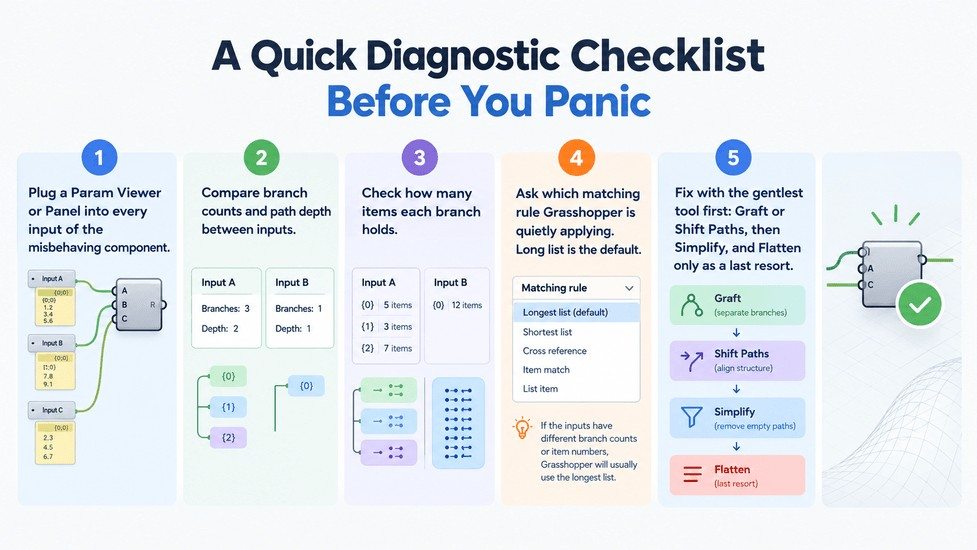
- Plug a Param Viewer or Panel into every input of the misbehaving component.
- Compare branch counts and path depth between inputs.
- Check how many items each branch holds.
- Ask which matching rule Grasshopper is quietly applying. Long list is the default.
- Fix with the gentlest tool first: Graft or Shift Paths, then Simplify, and Flatten only as a last resort.
Data tree logic is taught from first principles in Kaarwan's Rhino & Grasshopper Certification, so you stop patching definitions and build ones that hold up.
Want more free troubleshooting resources like this? Grab Kaarwan's free Architect's Toolkit and keep building your computational design skills, one fixed definition at a time.
Ready to stop patching Grasshopper definitions? Learn data trees, parametric logic, and advanced workflows hands-on with Kaarwan’s Rhino & Grasshopper Certification.
Three Things to Take With You
- Hover and look before you fix. Most data tree errors are visible in the structure.
- Graft adds branches, Flatten removes them. Match the tool to what the next component expects.
- Try Shift Paths and Simplify before reaching for Flatten.
If you'd like to learn this properly rather than by trial and error, the Rhino & Grasshopper Certification is where we teach it from the ground up. For more free resources, the Architect's Toolkit is a good next stop.
Team Kaarwan helps architects, engineers and designers across India build practical, job-ready skills through industry-led courses and masterclasses.
FAQs
What does graft do in Grasshopper?
Graft puts each item of a list into its own branch. That lets you match one list against another, one item at a time, instead of letting Grasshopper pair them by position.
When should I flatten a data tree in Grasshopper?
Flatten when a component needs one plain list, for sorting, culling or joining. If you'll need the original structure back, plan to Unflatten Tree afterwards.
Why is my Grasshopper output showing the wrong number of items?
Usually long-list matching. When inputs differ in length or branch count, Grasshopper repeats the last item to make them fit. Check both inputs in Param Viewer, then graft or reshape until the structures match.
What is Path Mapper used for in Grasshopper?
It rewrites branch paths using a rule you define. Use it to drop unused indices, swap them or merge branches so two trees line up.