

Here is a question worth asking yourself honestly: how many architecture or design students do you know who still rely entirely on AutoCAD or SketchUp, then spend hours manually redrawing a facade every time a client changes their mind? The answer, if you are in a design school in 2026, is probably quite a few. And that gap — between what studios still teach and what firms now actually hire for — is precisely why Rhino 8 and Grasshopper have become the skills worth investing in right now.
This is a beginner’s guide and an honest, research-backed guide to understanding what these two tools are, why they matter to a student specifically in 2026, and how to build genuine fluency with them step by step. Whether you are in your second year of architecture school or have just enrolled in a computational design course, this roadmap is written for you.
So What Exactly Is Rhino 8, and Why Should You Care?
Rhinoceros 3D — or Rhino, as everyone calls it — is a NURBS-based 3D modelling software developed by McNeel and Associates. NURBS stands for Non-Uniform Rational B-Splines, which is a fancy way of saying that Rhino handles curved, organic, and irregular geometry with a level of mathematical precision that programs like SketchUp were not built for.
Rhino 8, the current version, arrived with a set of upgrades that actually changed how people work — not just marketing-speak updates. The headline features worth knowing about as a beginner:
- ShrinkWrap: Creates watertight meshes around any geometry, which is a game-changer for 3D printing workflows.
- SubD Creases: Adds fillet-like features to Sub-D models with far less effort than before — huge for product and furniture designers.
- PushPull Workflows: Borrowed from the SketchUp world, adapted intelligently for NURBS — rectilinear forms that students previously found tricky in Rhino now feel intuitive.
- Monochrome Display Mode: A clean, minimal viewport mode that has become popular for architectural presentation sheets.
- New Grasshopper Data Types: The link between Rhino’s modelling engine and Grasshopper’s programming environment got faster and more data-rich in version 8.
All things considered, we must also look at pricing. For students, an educational license for Rhino 8 costs significantly less than a commercial one, and the perpetual licensing model means you pay once and own it. In a world where most software has moved to subscription-only models, that actually stands out.
Rhino vs. SketchUp vs. AutoCAD: What Students Are Actually Searching For in 2026
If you track what architecture and design students type into search engines, a pattern emerges clearly in 2026. Searches like “Rhino 8 for beginners,” “how to learn Grasshopper fast,” “Rhino vs SketchUp for architecture,” and “parametric design tutorial free” have climbed steadily. The questions are telling: students are no longer confused about whether to learn Rhino. They are confused about where to start and what to prioritise.
Here is a plain comparison that answers the most common question directly:
| Feature | Rhino 8 | SketchUp | AutoCAD |
| Geometry Type | NURBS + SubD + Mesh | Push-Pull Polygons | 2D + Basic 3D |
| Organic / Complex Forms | Excellent | Limited | Very Limited |
| Parametric Design | Yes (Grasshopper) | No | No |
| Learning Curve | Moderate | Easy | Moderate |
| Industry Use (AEC) | High (facades, advanced) | Medium (concept) | High (docs, basic) |
| 3D Printing Ready | Yes (ShrinkWrap) | With plugins | No |
| Computational Scripting | Yes (Python/GH) | Limited | Limited |
| Student License Cost | Low (perpetual) | Subscription | Subscription |
The takeaway is not that Rhino replaces the other two. AutoCAD remains essential for construction documentation. SketchUp is still useful for early massing. But Rhino 8 with Grasshopper is where complex design thinking lives — and that is the space that firms like Zaha Hadid Architects, Bjarke Ingels Group, and Foster + Partners operate in daily.
Grasshopper: Not Just a Plugin, But a Different Way of Thinking
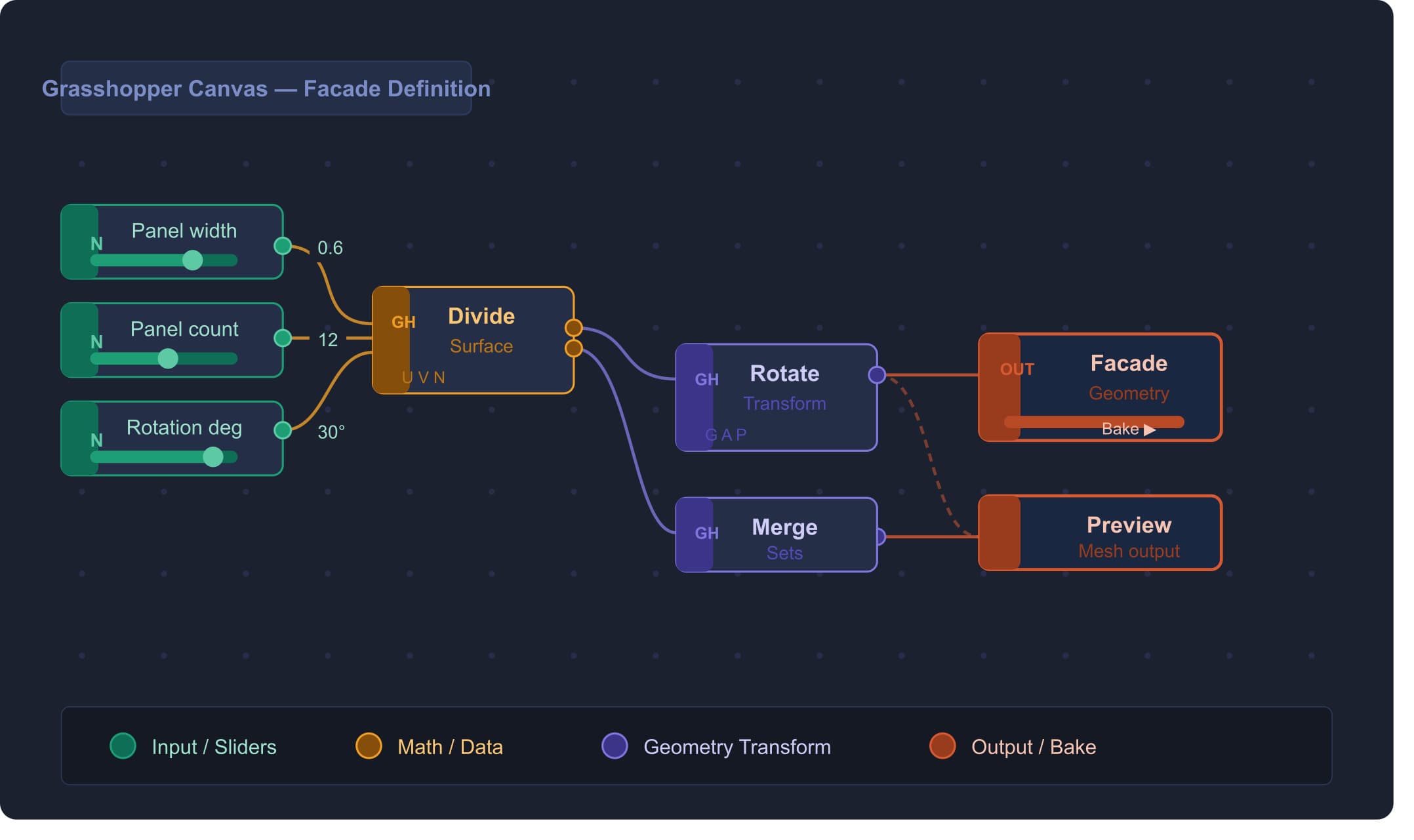
Grasshopper lives inside Rhino and opens as a visual programming canvas. Instead of drawing a wall or typing a command, you build a network of connected nodes. Each node is a small function — a number slider, a geometry reference, a mathematical operation. Connect enough of them in the right order, and you have a definition: a set of instructions that Rhino uses to generate geometry.
The real power is this: change one slider, and every geometry that depends on it updates automatically. This is not just convenient. It is a fundamentally different approach to design — one where you are defining relationships between elements, not drawing fixed shapes.
Imagine designing a facade with 200 panels. In SketchUp, moving a panel means individually adjusting each one. In Grasshopper, you tweak the angle parameter in one slider and all 200 panels respond simultaneously. That is the point.
One learning curve that trips a lot of students up early on, specifically around something called Data Trees. A data tree in Grasshopper is how the program organises multiple pieces of geometry at once. Mastering it — understanding Graft, Flatten, and Simplify — is the single most important step between being a beginner and actually being productive. Every tutorial worth following in 2026 will reinforce this.
A Real Beginner Learning Path: From Zero to Functional in 2026
There is a lot of scattered advice online about how to learn these tools. Most of it tells you to just watch YouTube tutorials and practice. That’s not wrong, but it misses the order in which things need to happen. Here is a structured roadmap that actually works:
Phase 1 — Get Comfortable with the Interface (Week 1–2)
Start with Rhino alone — do not open Grasshopper yet. The interface has four viewports (Top, Front, Right, Perspective), and your first job is to stop being intimidated by them. Learn the orbit, pan, and zoom commands until they feel like second nature. Practice drawing lines, curves, and surfaces. Get familiar with the command line — unlike SketchUp, where most actions are icon-driven, Rhino’s command line is how professionals actually work.
- Resource: The official Rhino Level 1 training PDF (free on McNeel’s website) covers exactly this.
- Goal by the end of Phase 1: Model a simple 3D object — a chair, a pavilion column, a simple form — entirely from scratch.
Phase 2 — Introduction to Grasshopper Logic (Week 3–5)
Now open Grasshopper (type “Grasshopper” in the command line). You will see a blank canvas. Your first two sessions should be spent understanding just four things: how to reference geometry from Rhino, how to use number sliders, how to use panels for text output, and how to use the Bake function to bring Grasshopper geometry back into Rhino.
- First project: A parametric box where length, width, and height are controlled by sliders. Simple, but it teaches you the entire logic of the tool.
- David Rutten’s Grasshopper Primer (free PDF, available via grasshopper3d.com) remains the gold standard for this phase in 2026.
Phase 3 — Work With Data Trees and Lists (Week 6–8)
This is where most beginners stall — and where the ones who push through start getting hired. Data trees describe the structure of geometry in Grasshopper. When you work with multiple surfaces or curves simultaneously, you need to understand how the data flows. Practice with List Item, Shift List, Partition, and Path Mapper. These are not sexy components, but they are the grammar of Grasshopper.
- Project: A parametric facade made of repeated panels, where panel rotation changes based on a mathematical formula you feed in through a slider.
Phase 4 — Add Plugins (Week 9–12)
This is when Grasshopper becomes genuinely powerful. Plugins extend what the base tool can do, and by 2026, a few have become essentially standard curriculum in top architecture schools:
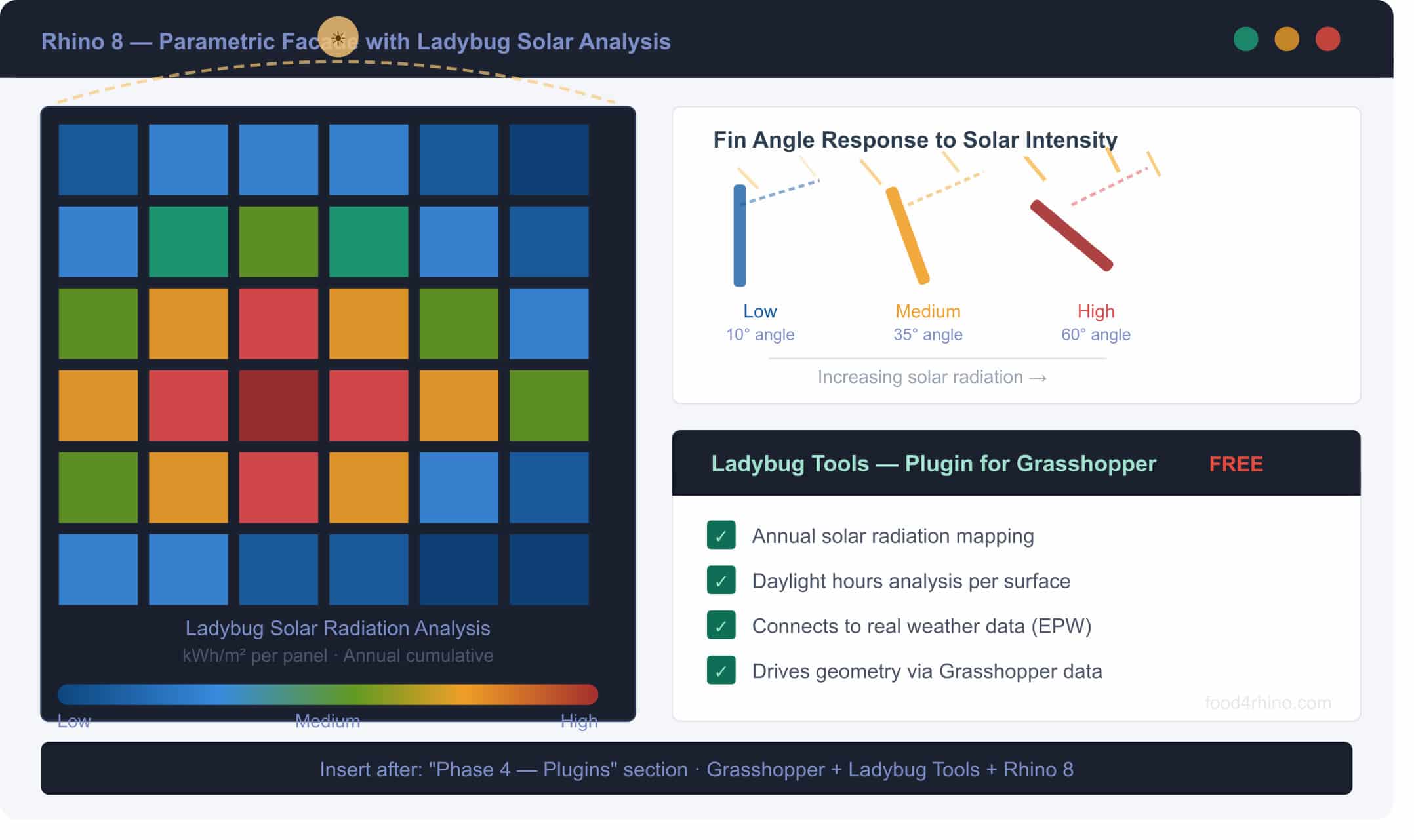
- Ladybug Tools (Ladybug + Honeybee): For environmental analysis — solar radiation, daylight, energy performance. Used by firms working on green architecture. Free on Food4Rhino.
- Kangaroo: A physics engine embedded in Grasshopper. Used for form-finding, tension structures, and material simulation. Ships with Rhino 6 and later.
- Karamba3D: Structural analysis inside Grasshopper. Version 3 was released recently, now compatible with Rhino 8. Widely used in academic and professional structural optimisation projects.
- Weaverbird: For mesh subdivision and panelisation. Useful for creating complex surface textures that feed into CNC or 3D print workflows.
- Lunchbox: A collection of panelisation and data tools popular for facade generation.
All of these are available through Food4Rhino (food4rhino.com), which is McNeel’s official plugin marketplace. Most are free.
What Students Get Wrong (And How to Fix It)
After speaking with educators and reviewing feedback from students across design programs, a few consistent mistakes surface:
- Jumping straight into Grasshopper without knowing Rhino first. Grasshopper references geometry from Rhino, so if you don’t understand how Rhino handles surfaces and curves, your definitions will fail, and you won’t know why.
- Watching tutorials passively. Grasshopper is a spatial and logical skill. You learn it by doing, not by watching someone else do it. Every tutorial you follow should be replicated, then broken intentionally, then rebuilt.
- Skipping Data Trees. Students often copy definitions they find online and wonder why their output looks different. Nine times out of ten, it is a data tree mismatch. You cannot shortcut this topic.
- Not connecting to fabrication outputs. Grasshopper’s real value in a studio environment is that definitions can drive CNC cutting files, 3D print meshes, or laser cutting layouts. If you’re only using it to generate pretty geometry without understanding how it connects to making, you’re leaving the most interesting part of the tool untouched.
Career Relevance in 2026: What the Data Actually Says
Let’s be direct about the career argument because it matters. Job postings for computational designers and parametric modelling specialists have grown faster than traditional architecture job listings over the past two years. Research published in 2025 noted that 87% of firms surveyed reported a shortage of computational design skills among applicants — and that designers with Rhino and Grasshopper proficiency regularly command higher starting salaries than peers with equivalent academic qualifications but only conventional CAD backgrounds.
Beyond salary, the scope of work that becomes available when you are fluent in Grasshopper expands significantly:
- Facade design and panelization at firms working on complex building envelopes
- Environmental performance analysis on early-stage design proposals
- Digital fabrication management where CNC, robotic cutting, and 3D printing workflows need parametric inputs
- BIM integration using Rhino.Inside — a tool that lets Grasshopper definitions run inside Revit, bridging the gap between computational design and documentation
- Product design, jewellery, and industrial design roles that rely on precise organic form generation
For Indian architecture and design students specifically, this is a window. The domestic architecture industry is increasingly working on complex mixed-use and infrastructure projects that require computational workflows. Firms that previously outsourced this kind of work are building in-house parametric design capability — and they are looking for people who already know the tools.
A Closer Look at What You Can Actually Build
Abstract learning advice only goes so far. Here are five concrete project types that beginners can attempt in 2026, in roughly increasing order of complexity:
- Parametric Vase or Vessel: Height, width, number of sections, and wall twist are all driven by sliders. A good first project that teaches surface generation from curves.
- Voronoi Panel Wall: Take a flat NURBS surface and cover it in a Voronoi-patterned cell system. This is used in real facade and interior design work and appears often in student portfolios.
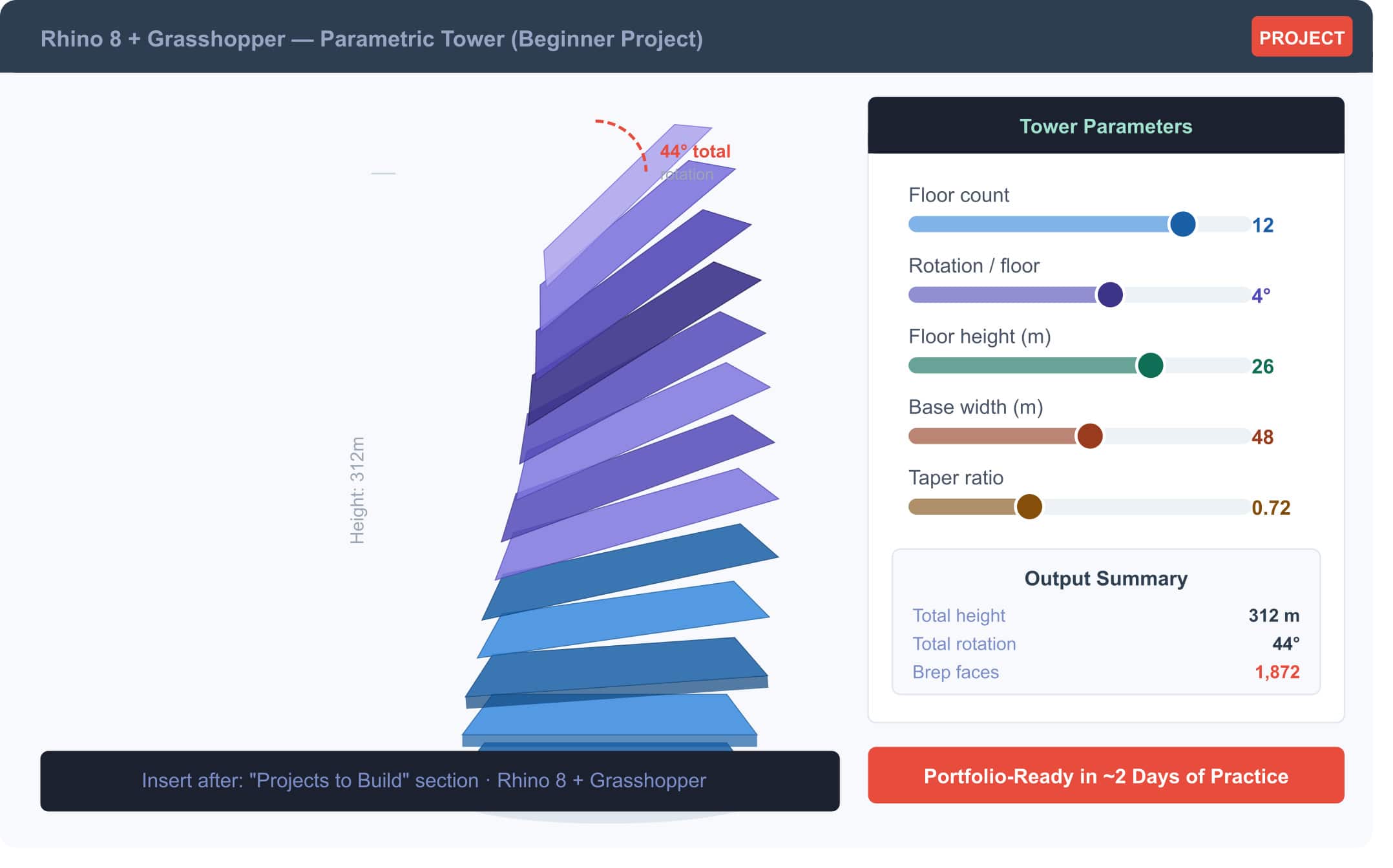
- Parametric Tower: Four control points define a tower’s profile, and Grasshopper generates the floors, structural grid, and skin automatically. This is the kind of project that immediately translates into a strong portfolio piece.
- Solar-Responsive Facade: Using Ladybug, analyse the sun path at a given latitude, then use that data to rotate facade fins automatically so each one blocks direct summer sunlight while allowing winter sun in. This is environmental architecture in practice.
- Tensile Pavilion with Kangaroo: Simulate a fabric membrane structure under tension, find the natural form the structure wants to take, then export the geometry to fabrication. Used at institutions including TU Delft and the AA School.
The Resources That Are Actually Worth Your Time in 2026
The internet has no shortage of Rhino and Grasshopper content. The problem is quality and sequencing. Here is a curated list of the sources that consistently appear in the learning journeys of students who actually progress:
- grasshopper3d.com: The official community forum. David Rutten’s Grasshopper Primer PDF is hosted here and remains unmatched as an introduction to algorithmic thinking.
- rhino3d.com/learn: McNeel’s own learning hub, with organised tutorials covering Rhino for Windows, Mac, SubD, Grasshopper, rendering, and fabrication.
- parametrichouse.com: A well-organised collection of beginner and intermediate Grasshopper tutorials, including practical projects like parametric facades, pavilions, and furniture. Good for Phase 3 onwards.
- howtorhino.com: Step-by-step tutorials that prioritise clarity and visual explanation, suited for people who learn better by seeing annotated workflows rather than just watching videos.
- Kaarwan’s Rhino + Grasshopper courses: Structured as live, mentor-led sessions specifically designed for students at the beginner to intermediate level, with feedback from instructors who work in practice.
- food4rhino.com: Where all plugins live. Before downloading anything, read the documentation for compatibility with Rhino 8.
The Bottom Line
Rhino 8 and Grasshopper are not niche tools for specialists anymore. They are the working language of a significant and growing portion of the design industry. In 2026, with Rhino 8’s expanded features, a maturing plugin ecosystem, and a job market that keeps signalling the value of computational skills, learning these tools is less of a career differentiator and more of a baseline competency for anyone serious about architecture, product design, or computational practice.
The question is not whether to learn them. The question is whether you start seriously now — or scramble to catch up two years from now when the gap between what you know and what studios expect has grown wider.
Pick a phase from the roadmap above, set a time limit, and build something. The first thing you make in Grasshopper will be a mess. That is exactly as it should be.
So, this is where you begin.
FAQs
Q1: What is Rhino 8 used for?
Rhino 8 is used for advanced 3D modelling, parametric design, and fabrication workflows.
Q2: Is Rhino better than SketchUp?
Rhino is better for complex and precise modelling, while SketchUp is easier for quick concepts.
Q3: Can beginners learn Grasshopper?
Yes. Grasshopper uses visual programming, so no coding experience is required.
Q4: How long does it take to learn Rhino and Grasshopper?
Rhino basics take a few weeks, while Grasshopper takes a few months of practice.
Q5: What is Grasshopper used for?
Grasshopper is used for parametric modelling, automation, and computational design.
Q6: Do architecture firms use Rhino and Grasshopper?
Yes. Many firms use them for facades, complex geometry, and digital workflows.
Q7: Is Rhino 8 good for 3D printing?
Yes. Rhino 8 includes tools for creating clean, printable 3D models.
Q8: What are the best Grasshopper plugins for beginners?
Ladybug, Kangaroo, Weaverbird, Lunchbox, and Karamba3D are popular beginner plugins.
Q9: Can Rhino work with Revit?
Yes. Rhino.Inside.Revit connects Rhino and Grasshopper with Revit workflows.
Q10: Are Rhino and Grasshopper worth learning in 2026?
Yes. They are highly valuable skills for architecture, design, and fabrication careers.




.png)