


Imagine presenting your design not just as a technical drawing, but as a living, breathing space; sunlight streaming through windows, trees swaying gently outside, reflections dancing across water. Sounds like a dream, right?
But here’s the challenge: you're new to the industry. Who’s going to take your ideas seriously?
Unless... you know how to communicate them.
That’s where Lumion comes in. Loved by beginner and seasoned architects alike, Lumion helps you transform your ideas into stunning, cinematic renders, even if you're just starting out.
In the fast-changing world of 3D visualisation tools, Lumion remains the preferred option for architects and designers as of 2025. Despite the many rendering software alternatives like Enscape, Twinmotion, and Unreal Engine available, Lumion distinguishes itself through its intuitive interface and outstanding results, making it easy to use even for newcomers.
Is Lumion still worth learning in 2025?Will it help you land a job, or get replaced by a faster, flashier tool?
Let’s unpack that.

Source : Lumion
What is Lumion? A Quick Refresher
Lumion is a real-time architectural rendering software that transforms your 3D models into photorealistic images, animations, and immersive experiences. Think of it as the magic wand that brings your designs to life—especially useful when you're trying to impress clients or juries.
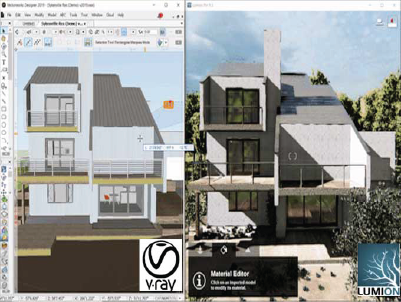
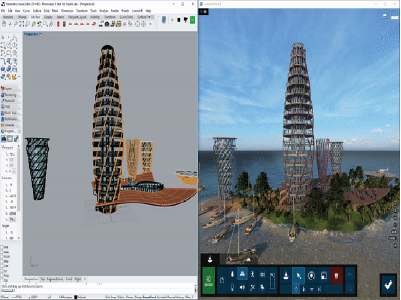
It works well with tools like SketchUp, Revit, Rhino, and ArchiCAD, making it a favourite for design professionals and students alike.
Pros of Using Lumion in 2025
- Super Fast Rendering: Lumion is built for speed. You can render full HD videos in minutes, even on mid-range PCs (with decent GPUs).
- Visual Quality (Without the Complexity): You don’t need to be a CGI wizard. The user interface is intuitive, and you get high-quality output with minimal tweaking.
- Massive Asset Library: Trees, furniture, cars, people—everything’s drag-and-drop. Perfect for detailed landscape and urban design visuals.
- Real-Time Sync with Revit/SketchUp: LiveSync lets you make design changes in your modelling software and see updates instantly in Lumion.
- Industry Standard for Students & Freelancers: Many architecture colleges and freelance professionals prefer Lumion due to its ease of use and fast learning curve.
Cons of Using Lumion (And Why They Matter)
- Windows-Only: Sorry, Mac users—unless you're on BootCamp or a Windows emulator, you're locked out.
- High GPU Requirement: Lumion needs a powerful graphics card to run smoothly. It’s not beginner-laptop friendly.
- Less Flexibility than Unreal or Blender: While great for stills and videos, it’s not ideal for game engine-level customisation or ultra-detailed animation.
- Expensive Licensing for Beginners The full version is pricey, especially for new freelancers. (However, some schools offer student licences.)
Explore Kaarwan’s limited-time, student-friendly live courses:
Quietly build confidence in the skills that help you step into studios with ease. Take a peek at what’s possible, explore our alumni portfolios.
Souce: sketchup4architects
Is Lumion Career-Relevant in 2025?
Short answer: Yes, but it depends on your path.
Lumion is widely favoured by architectural firms, with estimates indicating that more than 70% of leading architectural offices globally utilise it. Moreover, Lumion holds a market share of 15.31% within the technology, design, and architecture sector, as reported by 6Sense.
If You're a Student or Intern:
- Lumion is great for learning visual storytelling and presentation.
- It helps you create jaw-dropping juries without spending days on post-production.
- Plus, many portfolio reviewers are familiar with the look and feel of Lumion renders.
If You're a Freelance Architect or Junior Designer:
- Clients love visuals. Lumion helps you communicate ideas faster and better, especially in remote discussions.
- It’s also a quick way to update renders based on real-time feedback.
If You're in BIM or Technical Detailing:
- Lumion is not the best tool for documentation or technical accuracy.
- But paired with Revit or ArchiCAD, it becomes a brilliant way to present work clearly to non-architect clients.
If You're Aiming for CGI/Animation/AAA Visualisation:
- You’ll outgrow Lumion.
Unreal Engine, Blender, or 3ds Max with V-Ray offer more creative control, but with steeper learning curves.
Source: Lumion Support
Let Curiosity Lead. Start With Wallet-Friendly Previews and Find Your Niche Along the Way.
Final Take: Where Does Lumion Fit in Your Learning Path?
Think of Lumion as your presentation partner, not your entire toolbox.
In the world of architecture, especially in India and similar markets, fast, clear, emotionally compelling visuals are key to convincing clients and building trust. Lumion offers that, without the months of training some other software requires. Plus, many design studios from renowned to local are familiar with Lumion's interface; thus, one can coordinate with the team and its expectations accordingly.
As you grow, you can always explore Vray, Twinmotion, Unreal, or Blender. But starting with Lumion builds confidence, speed, and the “wow” factor early in your journey.

Take a peek at what’s possible, explore our alumni portfolios.




.png)