


Super apps have taken the digital world by storm, redefining the way users interact with online services. Unlike traditional single-purpose apps, super apps function as multi-service platforms, integrating diverse features such as messaging, payments, e-commerce, transportation, and more—all within a single ecosystem.
Apps like WeChat, Grab, and Gojek have demonstrated the immense potential of super apps, driving user engagement and business growth. However, the complexity of these applications brings new challenges for UI/UX designers. Striking the right balance between functionality and simplicity is crucial to ensuring a seamless user experience.
This blog explores how super apps are reshaping UI/UX design, the principles behind their success, and what designers should consider when building intuitive and engaging super app experiences.
What is a Super App?
A super app is a single application that integrates multiple services, eliminating the need for users to switch between multiple apps. It serves as an all-in-one solution, offering functionalities such as:
- Social interactions: Messaging, video calls, and social networking.
- Financial services: Mobile wallets, digital payments, and banking.
- E-commerce: Online shopping, food delivery, and product recommendations.
- On-demand services: Ride-hailing, logistics, and home services.
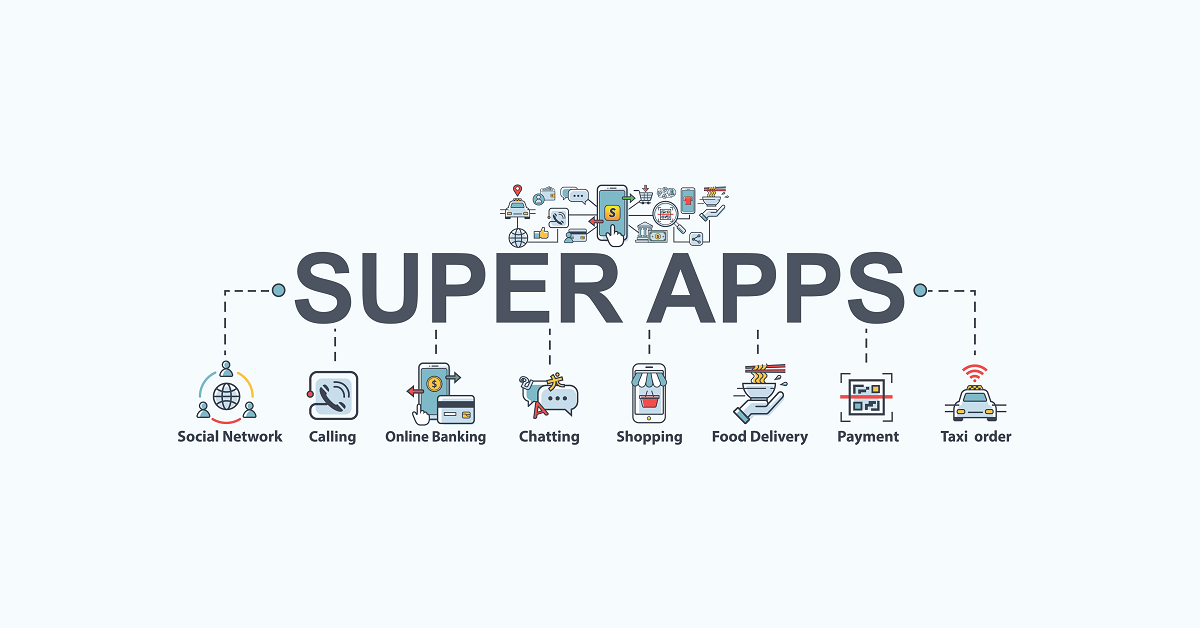
Image Credit - UX Collective
Why Are Super Apps Gaining Popularity?
- Convenience: Users prefer having multiple services in one app rather than juggling multiple applications.
- Cost Efficiency: Businesses save on development and marketing costs by integrating services into a single ecosystem.
- User Engagement: By offering diverse services, super apps retain users for longer periods, increasing app stickiness.
- Data Synergy: Super apps leverage user data across services to offer personalized experiences and targeted promotions.
How Super Apps Are Changing UI/UX Design
1. Simplifying Complex Navigation
With multiple services under one roof, super apps require a well-structured navigation system that minimizes cognitive load. Unlike traditional apps with linear user flows, super apps must accommodate multiple entry points and service paths.
Best Practices:
- Use a bottom navigation bar with primary services.
- Implement a search-first approach, allowing users to find services quickly.
- Offer a customizable home screen, letting users prioritize frequently used features.
2. Prioritizing Personalization
Super apps rely heavily on personalization to enhance user experience. By analyzing user behavior, these apps recommend services, products, and content tailored to individual preferences.
Personalization Techniques:
- AI-driven recommendations for shopping, dining, and services.
- Dynamic content adjustments based on past interactions.
- Localized user experiences, catering to regional preferences.
3. Optimizing UI for Information Density
A super app's UI must display vast amounts of information without overwhelming users. The key is to organize content effectively while maintaining visual clarity.
Effective UI Strategies:
- Use card-based layouts to group related services.
- Maintain a consistent design language for seamless transitions.
- Prioritize progressive disclosure, revealing details only when needed.
4. Enhancing Microinteractions for Seamless Engagement
Microinteractions—small animations or effects triggered by user actions—play a crucial role in guiding users through super apps. They improve usability, provide instant feedback, and make the experience more engaging.
Examples of Microinteractions in Super Apps:
- Subtle loading animations when fetching data.
- Button hover effects to indicate interactivity.
- Real-time transaction confirmations for digital payments.
5. Ensuring Cross-Platform Consistency
Super apps often cater to a diverse user base across different devices, making cross-platform consistency essential. Whether users access the app via mobile, tablet, or desktop, the experience should remain uniform.
Key Considerations:
- Use responsive design principles to adapt UI elements dynamically.
- Implement gesture-based interactions for mobile-first experiences.
- Maintain branding consistency across all platforms.
6. Prioritizing Speed and Performance
With so many features packed into a single app, performance optimization is critical. Slow load times and laggy interactions can frustrate users and lead to drop-offs.
Ways to Improve Performance:
- Implement lazy loading to reduce initial load times.
- Optimize API calls to minimize backend latency.
- Use lightweight UI components for faster rendering.
7. Balancing Monetization Without Compromising UX
Super apps generate revenue through multiple streams—ads, commissions, subscriptions, and partnerships. However, excessive monetization elements can disrupt the user experience.
Best Monetization Strategies:
- Use native ads that blend seamlessly with the UI.
- Offer freemium models with optional premium services.
- Leverage subscription-based services for added value.
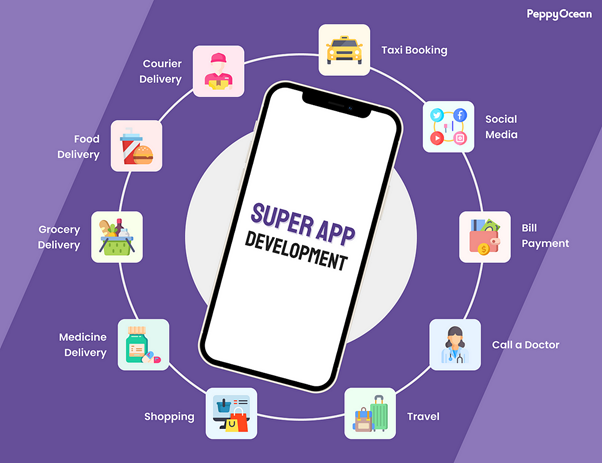
Image Credit - PeppyOcean
What you'll learn:
- Learn from industry experts and master practitioners.
- Engage in hands-on, project-based learning experiences.
- Connect with a vibrant community of creatives and professionals.
- Receive a certificate to boost your portfolio and credentials.
Challenges in Super App UI/UX Design
1. Avoiding Clutter
With multiple services in one platform, clutter can become a major issue. Designers must create a decluttered, intuitive interface that presents only essential information upfront.
2. Onboarding Complexity
Since super apps offer various features, onboarding new users can be overwhelming. A guided onboarding experience with interactive tutorials and progressive introduction helps users adapt.
3. User Retention Across Multiple Services
Keeping users engaged across different services requires smart notifications, loyalty programs, and gamification elements to maintain interaction.
4. Security and Privacy Concerns
Handling multiple transactions and sensitive data means robust security measures must be in place, including:
- Biometric authentication for login and payments.
- End-to-end encryption for messaging and transactions.
- Granular permission settings to give users control over their data.
Future Trends in Super App UI/UX
1. AI-Powered Chatbots and Virtual Assistants
Super apps are integrating AI-driven chatbots to assist users with bookings, payments, and inquiries in real-time.
2. Voice and Gesture-Based Interactions
With advancements in voice recognition technology, users can navigate super apps hands-free, enhancing accessibility.
3. Blockchain for Secure Transactions
Super apps are exploring blockchain integration to offer secure, transparent, and decentralized transactions.
4. Augmented Reality (AR) Experiences
From virtual shopping to interactive maps, AR elements are enhancing the user experience within super apps.
5. Decentralized Super Apps
A new wave of decentralized applications (dApps) is emerging, offering similar functionalities while prioritizing user privacy and data ownership.

Image Credit - Team Tweaks
Conclusion
Super apps are reshaping UI/UX design by integrating multiple services into a seamless ecosystem. The challenge for designers lies in balancing functionality with simplicity, ensuring users can navigate effortlessly without feeling overwhelmed.
By focusing on intuitive navigation, personalization, microinteractions, performance optimization, and security, super apps can provide a user experience that keeps users engaged and satisfied. As technology evolves, AI, voice commands, and blockchain will further enhance these platforms, making them even more powerful.
The future of super apps lies in creating a unified, user-centric experience that offers convenience without compromising usability—and that is the key to long-term success.
Level up your UI/UX skills! Learn to create stunning interfaces and seamless user experiences with our Advanced UI/UX Design Course. Boost your career and design products that stand out.
Enroll today at Kaarwan for more insights!
FAQs
1. What is a super app?
A super app is an all-in-one platform that integrates multiple services like messaging, payments, e-commerce, and transportation within a single application.
2. How do super apps impact UI/UX design?
Super apps require intuitive navigation, personalization, and optimized performance to handle multiple services while maintaining a seamless user experience.
3. What are some examples of super apps?
Popular super apps include WeChat, Gojek, Grab, and Paytm, which offer a range of services in a unified interface.
4. What are the biggest UX challenges in super app design?
The biggest challenges include avoiding clutter, simplifying onboarding, ensuring fast performance, and maintaining strong security measures.
5. What future trends will shape super apps?
AI-driven assistants, voice interactions, blockchain security, and AR-enhanced experiences will drive the next evolution of super apps.




