Okay so here's a question I've been getting a lot lately from students and even a few working architects - "should I learn Snaptrude or Forma?" And honestly, for the longest time nobody had written anything that actually compared the two head to head. You'd find Forma mentioned as an alternative to Snaptrude on some software listing site, or vice versa, but never a real "here's what each one does, here's the trade-off" breakdown. So that's what this is.
Quick context if you're new to this space - both tools sit in that early-design, AI-assisted category that's exploded over the last two years. If you want the bigger picture of how tools like these fit into the wider BIM automation shift, that's worth a read too. But for now, let's just get into what Snaptrude and Forma actually are, because they solve pretty different problems even though people lump them together constantly.
Also Read: AI BIM Civil Engineering 2026: How Automation Is Changing the Job
What Problem Do Both Tools Actually Solve?
Here's the thing that trips people up first - Snaptrude and Forma aren't really competing for the same job. They just happen to live in the same "AI + BIM" conversation.
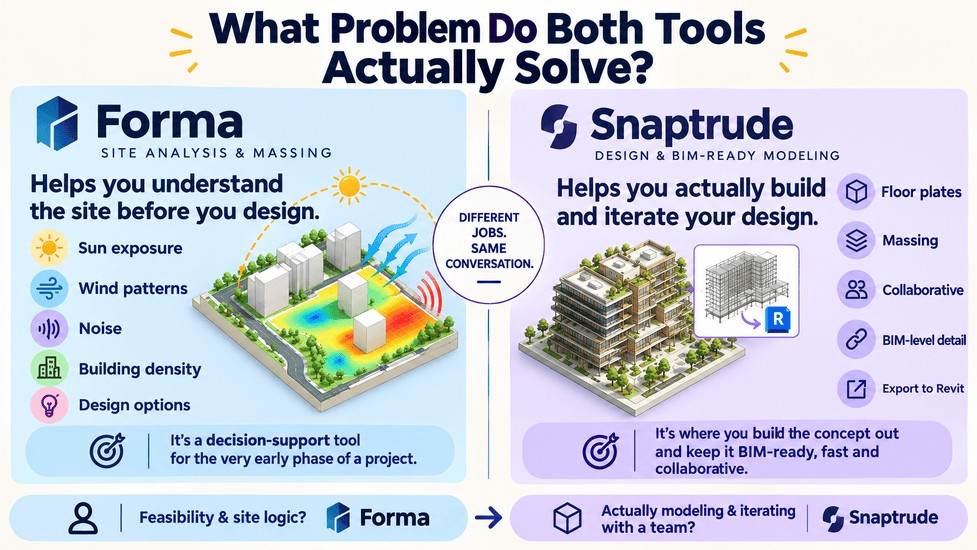
Forma is fundamentally a site-analysis and massing tool. You throw a site into it, and it tells you things about that site - sun exposure, wind patterns, noise, how dense you can build, what your options look like before you've drawn a single wall with intent. It's a decision-support tool for the very earliest phase of a project, when you're still figuring out if the idea even works.
Snaptrude is closer to a design tool. It's where you actually build the thing - floor plates, massing, spaces, and increasingly, BIM-level detail - and it does that fast, collaboratively, and with export paths straight into Revit. Where Forma asks "is this site viable," Snaptrude asks "let's build this concept out and keep it BIM-ready while we do it."
So really the honest answer to "which one should I learn" depends on what part of the workflow actually excites you or frustrates you the most right now. Feasibility and site logic? Forma. Actually modeling and iterating on a design with a team? Snaptrude.
Kaarwan's BIM Certification Program for Civil Engineers builds exactly the kind of Revit and BIM foundation that makes tools like Snaptrude and Forma click faster once you get to them - worth checking out before you dive into either.
Snaptrude: AI-Assisted Modeling and Real-Time Collaboration
Snaptrude's whole pitch is speed without giving up the BIM foundation underneath. It's cloud-native - nobody's emailing files around, nobody's waiting on someone to finish syncing a Revit central model. You and your teammates are literally in the same model at the same time, which if you've ever dealt with Revit worksharing headaches, sounds like a small miracle.
A few things worth knowing about how it actually works day to day:
- You can import from AutoCAD, SketchUp, Rhino, or Revit, and export back out to Revit with parametric family data intact - no flattening your model into dumb geometry.
- It generates area schedules, quick BoQs, and basic daylight checks automatically as you model, so you're not exporting to five other programs just to sanity-check your own design.
- The newer releases have leaned hard into AI-assisted brief-to-BIM workflows - you can hand it a room program or an RFP-style brief and it'll rough out a buildable layout that you then refine.
One thing to flag honestly - Snaptrude is still expanding its detailed-design and drawing-production capabilities. It's brilliant at concept-through-schematic work, but for construction documentation you're probably still finishing the job in Revit. That's not a knock, it's just where the product is in its lifecycle right now.
Also Read: Revit & BIM Workflow Changes in 2026: What to Learn
Autodesk Forma: Generative Site Analysis Within the Autodesk Ecosystem
Forma - you might know it by its old name, Spacemaker, before Autodesk bought it - lives one step earlier in the process than Snaptrude does. Its whole reason for existing is to take the guesswork out of "what can I even do with this site."
Feed it your site boundary and it runs real-time environmental simulations - sun, daylight, wind, noise, even embodied carbon in some workflows - and updates them instantly as you tweak the massing. No exporting to a separate energy-modeling tool and waiting overnight for results. You move a block, the numbers update. That immediacy changes how you actually make decisions, because you're not afraid to try five bad ideas when testing them costs seconds instead of a coffee break.
It also has a Site Automation feature that generates and ranks a bunch of massing options against whatever constraints you set - density, setbacks, code limits - which is genuinely useful when a client or professor wants "options," not just your one favorite idea.
If you want the deeper breakdown of what Forma's newer generative and neural-CAD features actually do, we've written a full guide on that already.
The catch, and it's a real one: Forma is deeply tied to the Autodesk ecosystem. Its best integrations are with Revit and Rhino. If your studio or firm runs on ARCHICAD or Allplan, you're mostly exporting rather than working natively, which takes some of the shine off.
Also Read : Autodesk Forma & Computational Design: The 2026 Guide
Feature Comparison: Massing, Analysis, Collaboration, Revit Integration
Let's just lay it out plainly, because a table honestly does this better than paragraphs would.
| Feature | Snaptrude | Autodesk Forma |
| Core focus | Concept-to-BIM modeling | Site analysis & massing |
| Environmental analysis | Basic daylight, area, BoQ | Real-time sun, wind, noise, carbon |
| Real-time collaboration | Yes, native multi-user | Limited, more single-user analysis |
| Revit export/round-trip | Native, parametric families | Native, but detailed work returns to Revit |
| IFC / Open BIM support | Yes | Via export, less native |
| Best design phase | Concept through early schematic | Feasibility & pre-concept |
| Ecosystem dependency | Platform-agnostic-ish | Autodesk-first |
Neither one wins outright - they're just built for different moments in a project's life.
Learning Curve: Which Is Easier to Pick Up First?
Realistically, Snaptrude has a gentler learning curve for a student. The interface leans toward "sketch and build," which feels closer to how most architecture students already think - you're modeling shapes and rooms, not running simulations. Most people get comfortable within a few days of playing around with it.
Forma asks a bit more of you conceptually. You need to actually understand what the sun and wind data mean and how to read them against zoning or code constraints - it's less about learning software and more about learning to interpret the outputs correctly. That's not necessarily harder, just a different kind of learning curve. It's data literacy as much as software literacy.
If you're brand new to AI-BIM tools altogether and just want a win early, Snaptrude will probably feel more rewarding sooner. If you already have some Revit chops and want to add a feasibility superpower to your toolkit, Forma's learning curve won't feel that steep either.
Also Read : 10 Best BIM Software for Civil Engineers 2026
Pricing and Access (Including Snaptrude's Free Plan)
This part matters more than people admit, especially if you're a student paying for tools out of your own pocket.
Snaptrude keeps a lower entry point - individual plans generally sit in the $60/month range, and there's a free tier that lets you build your first few projects without paying anything, which is exactly the kind of on-ramp students need before committing money. If your college or program has any tie-up with them, ask - a lot of ed-tech partnerships exist quietly that nobody advertises well.
Forma's pricing sits noticeably higher, often bundled into Autodesk's AEC Collection subscription rather than sold purely standalone, and unofficial estimates put a standalone plan somewhere in the $300/month range depending on region and licensing. If your school already has an Autodesk education license (a lot do, through the Autodesk Education program), you might already have access without knowing it - worth checking before you assume it's out of reach.
Which Firms and Roles Actually Use Each Tool
Snaptrude tends to show up in smaller, design-forward studios and firms that are trying to move fast without hiring a dedicated BIM manager - younger practices, competition-heavy studios, and teams that value speed of iteration over deep documentation control early on.
Forma shows up more in larger firms and developer-facing practices - places doing urban-scale or campus-scale work where environmental performance data actually needs to go into a pitch deck or a planning submission. It's also increasingly common on the civil and infrastructure side, where site logic and code compliance decide whether a project even proceeds.
If you're leaning toward infrastructure or civil-adjacent work, it's genuinely useful to see how AI tools like these fit into the wider BIM automation shift happening across that side of the industry right now.
Want to get comfortable with the BIM fundamentals before diving into tools like Snaptrude or Forma? Kaarwan’s Professional BIM Certification Program for Civil Engineers builds a strong foundation in Revit, BIM workflows, and project coordination, making it easier to pick up AI-powered tools along the way.
Which Should You Learn First? A Practical Recommendation
If I had to just give you a straight answer - and I know that's what you actually came here for - I'd say start with Snaptrude if you're a student or early-career architect still building your BIM fundamentals. It's cheaper, faster to learn, and the collaborative modeling skill transfers to basically every future BIM tool you'll touch.
Learn Forma next, once you're comfortable reading environmental data and want to add feasibility analysis to your resume. It pairs beautifully with Revit-based workflows and it's the kind of skill that makes you useful in the earliest, highest-value conversations a firm has with a client.
Honestly though? Don't treat this as an either/or forever. The strongest portfolios in a couple years are going to belong to people who can move between both - feasibility thinking from Forma, fast BIM execution from Snaptrude. Learning one doesn't close the door on the other; it just tells you where to start.
FAQs
Can I learn both, or should I pick one?
You can absolutely learn both - they don't overlap enough to compete for the same mental space. Most people start with whichever one matches their current job or coursework needs, then pick up the other later.
Does Autodesk Forma replace the need for Snaptrude, or vice versa?
No, not really. Forma handles pre-concept feasibility; Snaptrude handles concept-through-schematic modeling. A lot of workflows genuinely use both in sequence.
Which tool integrates better with Revit workflows?
Both round-trip with Revit, but in different ways - Snaptrude keeps parametric family data intact on export, while Forma is built by Autodesk itself, so the pipeline feels more native if you're already deep in the Autodesk ecosystem.
Is Snaptrude free for students?
There's a free tier that lets you build a handful of projects at no cost, which is enough to genuinely learn the tool. Paid individual plans start around $60/month once you outgrow that.